

If you’re bogged down by slow, manual trade processes that end up costing you money, you’re not alone.
SignalStack connects a charting or strategy platform to your brokerage app, using automated execution to place orders as soon as your rules trigger.
In this SignalStack review, I’ll examine its speed, broker support, pricing, risks, and whether it is a practical tool for running a tested strategy.
>> Get Started With SignalStack Today <<
 What Is SignalStack? No-Code Alert-to-Order Automation for 34-Plus Brokers and Exchanges

SignalStack removes the need for manual trade execution by automatically routing webhook alerts to more than 34 supported brokers and exchanges. Its no-code setup, fast average routing speed below 0.45 seconds, unlimited broker connections, and broad asset support make it a practical automation solution for traders with established strategies. SignalStack combines average order routing under 0.45 seconds with 99.99% platform uptime while supporting over 10,000 traders and 34+ broker integrations. Backed by TrendSpider, it offers one of the most flexible no-code trade automation platforms currently available. SignalStack focuses exclusively on trade automation rather than market research or trade generation. Users must already have a tested strategy and alert system, making it best suited for traders who want to automate an existing workflow instead of discovering new opportunities.
SignalStack is a no-code automation platform that connects market alerts directly to more than 34 brokerage and exchange accounts.
Instead of opening an app and entering each order by hand, users can link alerts from a charting or strategy platform and let the system route those instructions automatically.
The service supports multiple asset classes, several common order types, paper trading, and connections to more than one brokerage account.
It also includes a dashboard for tracking alerts, connected accounts, and recent order activity.
What makes SignalStack appealing is the time it can save.
Folks who already follow a tested strategy may use it to reduce missed entries, limit manual errors, and stay consistent when alerts appear outside normal screen time.
It does not provide signals or build strategies, but it can make an existing process much easier to manage.
>> Try SignalStack’s No-Code Automation <<
Who Owns SignalStack? TrendSpider, SignalStack LLC, and the Company Behind the Platform
SignalStack is operated by SignalStack LLC and is part of TrendSpider.
TrendSpider develops charting, scanning, strategy-testing, and market-analysis tools.
 Its connection to SignalStack tracks well, as automated execution is a natural extension of chart-based alerts.
SignalStack LLC owns a Chicagoland headquarters through TrendSpider, a mailing address in Austin, Texas, a public phone number, and an official support email.
Sales support is from 9 a.m. to 5 p.m. Central Time on weekdays, while regular support runs from 2 a.m. to 10 p.m. Central Time, Monday through Friday.
I like seeing those details. A physical business presence does not guarantee flawless service, but it provides more accountability than an anonymous automation tool with no clear operator.
Is SignalStack Legit? Users, Broker Partnerships, and TrendSpider’s Backing Assessed
Yes, SignalStack appears to be a legitimate financial technology platform from where I’m sitting.
The company clearly states what the software does and what it does not do.
It publishes plan limits, legal terms, support information, a broker directory, and detailed documentation. Its connection with TrendSpider also gives the platform an established technology company behind it.
SignalStack boasts more than 10,000 traders currently in its ranks, alongside more than 61,000 assets.
The fact that 34+ brokerages and exchanges are willing partners also fills me with confidence.
>> Automate Alerts With SignalStack <<

How Does SignalStack Work? Four Steps From Alert Source to Automated Brokerage Order
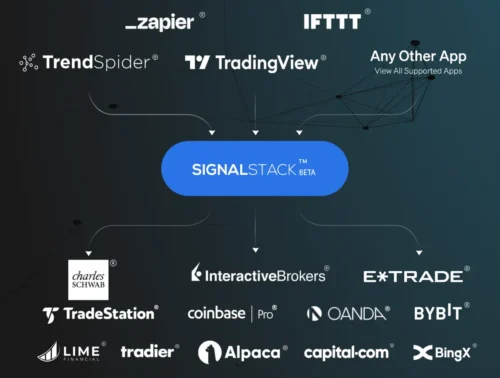
The main idea here is actually quite simple: an alert becomes an order.
Getting there involves several moving parts, though. I would break the process into four stages.
1. Choose an Alert or Charting Platform
You first need a source that can generate alerts.
That source could be a charting platform, an algorithm, a scanner, or a custom program. The key requirement is the ability to send webhook messages.
SignalStack advertises support for any charting platform that can send a webhook. That gives it more flexibility than an integration built around one charting brand.
TradingView and TrendSpider are natural examples. A custom application could work as well if it sends properly formatted instructions.
The alert source remains responsible for deciding when something should happen. SignalStack does not analyze a chart and create the signal itself.
2. Connect a Brokerage or Exchange Account
Next, you link a supported brokerage, futures account, forex platform, or cryptocurrency exchange.
From what I can see, you can connect to as many broker accounts as you need without paying an added connection fee.
SignalStack supports live and simulated accounts where your broker provides those account types.
Multiple connections can be useful when different assets sit in separate accounts. Someone might hold equities at one broker, futures at another, and cryptocurrency at an exchange.
That said, each connection should receive careful attention.
An alert sent to the wrong account could create an unwanted position even when the underlying strategy works as designed.
3. Build Order Instructions
Next up, you need to build out the order you want to execute when the system triggers an alert.
SignalStack converts those instructions into the selected broker’s format before forwarding the request.
Depending on the integration, there’s a lot of variability to consider with each instruction:
- Order type
- Limit price
- Stop price
- Time in force
- Account selection
- Position size
- Entry or closing action
Broker capabilities still determine which instructions will work in a specific account.
A valid order for one broker may not be available at another.
Options permissions, contract formats, regional restrictions, and account settings can also affect what happens after the message arrives.
4. Launch and Monitor the Automation
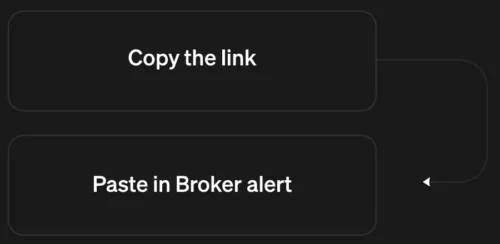
Once configured, copy the SignalStack link you generated into the source platform’s alert settings.
When the alert fires, the instruction travels to SignalStack. The platform interprets the message and sends the matching order to the connected account.
The brokerage then becomes responsible for accepting, rejecting, holding, or filling the order.
Keep in mind that a successful SignalStack signal means the broker received the order, but the broker still needs to execute.
A limit order can reach the account and sit open because the market never touches the requested price.
I would never turn on live automation and assume the process no longer needs supervision.
Get into the habit of checking your dashboard and brokerage account regularly, especially during the first few weeks.
>> Explore SignalStack By TrendSpider <<
SignalStack Features: Full Platform Breakdown for Traders and Strategy Builders
SignalStack centers its service on one job: turning alerts into brokerage orders with less manual work.
Here is a closer look at the main features and what each one means in practice.
 Dedicated SignalStack Dashboard
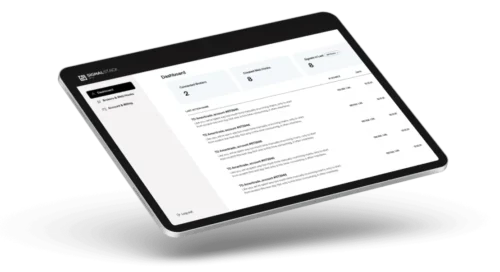
The dedicated SignalStack dashboard provides a single place to monitor connected brokers, recent signals, and active automations.
You can also see key account details such as the number of linked brokers, remaining monthly signals, and signals sent during the previous 24 hours.
You can also check order activity inside the connected brokerage account and the charting platform that created the original alert.
I like this setup because automated orders should never become invisible once they go live.
The dashboard helps you confirm that an alert reached SignalStack and was routed to the correct account.
 Automate Single Alerts or Full Strategies

SignalStack can automate one alert or handle a broader strategy with separate entry and exit instructions.
In one scenario, a setup might place a buy order when a price or technical condition triggers.
Another alert could later close that position when the exit rule appears.
With time, you can build a sequence of buy and sell orders around a complete rule-based strategy.
It’s nice that you can build out your setup over time, at your own pace, and you don’t need expertise in coding to make the whole thing work.
These executions are only as good as your instructions, though.
SignalStack executes the information it receives, so you will need to make sure to test every action, quantity, symbol, and price instruction before involving real funds.
>> Connect Your Broker With SignalStack <<
 Support Any Charting Platform
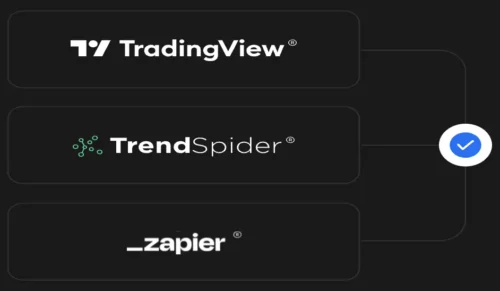
The platform is not limited to one charting provider.
SignalStack can accept alerts from any source that supports webhooks, which gives you more freedom to keep the software you already rely on.
TradingView and TrendSpider have direct documentation, while Zapier and IFTTT can help connect other applications or more involved workflows.
Custom webhook systems may work as well if you can build out the required order information.
That open structure is one of the platform’s stronger features.
You do not have to abandon a familiar charting or strategy platform just to automate orders.
 Easy Automation
While it takes a bit of effort to figure out the system, it’s possible to build out basic automations in as little as five minutes.
Advanced strategies will take longer to configure and test, but I wouldn’t expect otherwise.
To me, the process feels easier than creating a direct connection through a broker API, especially for someone without software-development experience.
Being able to connect several brokerage accounts without paying an added fee for each connection is another huge plus.
>> Put SignalStack To Work Today <<
Support Most Order Types
SignalStack supports many of the order types you likely already use through a brokerage account.
That includes market, limit, stop, stop-limit, and sell-to-close orders among the available choices.
Such a range gives you control over whether an order should seek immediate execution, wait for a chosen price, or respond when a stop level is reached.
Exact orders depend on the broker, asset, and account permissions. A broker may accept market and limit orders for stocks but apply different rules to options, futures, or cryptocurrency.
Some advanced instructions may also need specific formatting. For that reason, I would confirm the integration page for the selected broker before building a strategy.
Testing each order type separately can also prevent a minor formatting issue from disrupting a full automation.
Auto Trade Most Assets
SignalStack supports automation across stocks, cryptocurrency, futures, forex, contracts for difference, and options through compatible brokers and exchanges.
I think of it as a one-stop shop for managing your different asset classes across separate accounts.
Obviously, brokers must do business with the type of asset you’re working with if you want the connection to work.
Compatibility further depends on the account, region, permissions, and integration.
I would check the broker directory first and test the precise asset before assuming a strategy can move from one market to another without changes.
>> Streamline Orders With SignalStack <<
Reliable & Fast Order Execution

One of the most impressive things to me is that SignalStack orders reach the connected broker in less than 0.45 seconds on average.
Couple that with a 99.99% platform uptime, and there are few instances where a trade shouldn’t play out as intended.
Still, routing speed is not the same as fill speed.
Once the broker receives an order, execution depends on the order type, available liquidity, market movement, and the broker or exchange itself.
A limit order may remain open, while a market order could fill at a different price.
SignalStack can shorten one part of the process, but it cannot control everything that happens afterward.
No Coding Needed
No-code access is the feature that makes SignalStack practical for a wider audience.
The entire process is rather intuitive, from setting up alert templates to getting the links that feed into your broker.
That does not mean you can ignore the technical side completely.
There’s still a need to understand symbols, order direction, quantity, and the rules behind each alert.
More involved setups may require the company’s documentation, which SignalStack says contains over 1,000 pages of guidance.
The service removes programming from the process, but careful setup and testing remain necessary for safe automation.
>> Join SignalStack And Automate Smarter <<
What Can SignalStack Automate? Single Alerts, Full Strategies, and Supported Asset Classes
SignalStack can automate more than a simple market entry.
The platform supports one-time alerts and broader strategies with both buy and sell instructions. That leaves room for basic workflows and more detailed systems.
Single Entries and Exits
A simple setup may trigger one order when an asset crosses a chosen level.
For example, an alert could send a market or limit order when a technical condition appears. A separate alert might close the position once another condition becomes true.
This type of setup can help if you already know what to look for but struggle to act at the right time.
Full Strategies
A more advanced workflow can coordinate entries, exits, stops, and position management.
That sounds powerful, but complexity increases the chance of a configuration error. Every added condition introduces another place where symbol formatting, quantities, account selection, or order instructions could go wrong.
I would build full automation in stages. Start with one paper order. Confirm the size and direction, and add exits and other logic only after the first step works.
Supported Asset Classes
The official site says SignalStack can route orders for:
- Stocks
- Cryptocurrency
- Futures
- Forex
- Contracts for difference
- Stock options
Availability depends on the broker. An integration listed on the site does not mean every account can automate every asset or order type.
Options deserve added care because contracts require exact expiration dates, strike prices, and call or put designations.
Futures symbols may also change by contract month.
An alert that uses an incomplete or incorrect symbol may fail. Even worse, an incorrect setup could route an order to the wrong contract.
>> Upgrade Your Workflow With SignalStack <<
Paper Trading
Paper trading is one of the most important features in the package.
Paid plans include unlimited paper signals, while live orders count against the monthly signal allowance.
This is where I would spend the most time before enabling live execution.
Paper results will not recreate every real-world factor. They may not account for slippage, partial fills, liquidity, or sudden price movement.
However, they can show whether the alert reaches the right account with the correct symbol, direction, quantity, and order type.
SignalStack Refund and Cancellation Policy: No Refunds — What to Know Before Subscribing
SignalStack does not offer refunds, and you should make note of this before signing up.
You can however cancel or downgrade at any time. Paid signals remain available through the end of the current subscription period.
Any unused allowance disappears after the billing cycle ends.
I would prefer to see a short refund window, especially for annual plans.
Still, the free account offers a practical way to inspect the workflow before making a payment.
Starting with paper orders also reduces the need to buy a large plan before knowing whether the integration works for your needs.
>> Discover TrendSpider’s SignalStack Platform <<
After reviewing the current platform and legal terms, here are the main advantages and drawbacks I found.SignalStack Pros and Cons
Pros
Cons
>> Start Automating Trades With SignalStack <<
Does SignalStack Have a Track Record? What 10,000 Users and 99.99% Uptime Actually Tell You
SignalStack does not have a traditional performance record because it is not a stock-picking service or strategy provider.
The platform does not recommend trades, manage a model portfolio, or publish returns tied to its own market calls.
Its job is to route alerts from a charting or strategy platform to a connected broker.
The more relevant track record comes from its operating claims.
SignalStack says it supports more than 10,000 users, connects with over 34 brokers and exchanges, routes orders in less than 0.45 seconds on average, and maintains 99.99% uptime.
In practice, performance depends on more than SignalStack alone.
The alert source, broker response time, order type, liquidity, and market conditions can all affect the final outcome.
A successful signal only means the order reached the broker. It does not guarantee that the order is filled at the expected price.
For that reason, the best way to judge SignalStack is through paper testing.
That gives users a clear view of whether alerts arrive correctly, orders route as intended, and the setup fits their strategy.
>> Use SignalStack For Faster Execution <<
Who Is SignalStack Best For? Tested Strategy Users, Multi-Account Traders, and Active Algo Traders
SignalStack is best suited to people who already use a charting or strategy platform and want a faster way to send alerts to a brokerage account.
It makes the most sense for those with a tested approach, clear entry and exit rules, and enough experience to understand how different order types behave.
The platform may also appeal to anyone managing several broker accounts or working across stocks, crypto, forex, futures, or options.
Its no-code setup can save time for users who want automated execution without building a custom API connection.
Beginners can still explore the service, but I would not recommend moving straight into live orders.
Paper testing should come first so each alert, symbol, order size, and exit instruction can be checked before real money is involved.
>> Build Smarter Automations With SignalStack <<
 Who Should Avoid SignalStack? Beginners, Passive Investors, and Anyone Without a Tested Strategy

SignalStack is not a good fit for complete beginners who do not yet have a clear strategy or understand basic order types.
The platform only carries out the instructions it receives, so it cannot fix weak alerts, poor position sizing, or unclear entry and exit rules.
It may also feel unnecessary for people who place only a few trades each month or prefer entering orders by hand.
Anyone expecting built-in signals, guaranteed fills, or automatic profits will likely be disappointed.
The service also requires regular monitoring.
Users who are uncomfortable connecting software to a brokerage account, checking order activity, or testing alerts in a paper account should avoid moving into live automation.
>> Connect Alerts Directly With SignalStack <<
How Much Does SignalStack Cost? Free, Basic, Premium, and Pro Plan Pricing Compared
SignalStack offers four plans based on the number of live orders routed each month.
A signal counts when an order reaches the connected broker successfully. It does not need to fill immediately to count toward the monthly allowance.
Orders rejected with a broker error do not count, but unused signals expire at the end of each billing cycle instead of rolling over.
Broker commissions and exchange fees remain separate from the subscription cost.
The Free Plan includes up to five live signals per month.
It is the best place to start because it gives users a chance to connect an account, test the dashboard, and confirm that alerts route correctly before paying.
Five signals will not support an active strategy, but the plan offers enough room to judge whether the service fits an existing setup.
The Basic Plan includes 50 live signals per month, unlimited paper signals, and unlimited broker connections.
It’s a likely fit for strategies that trigger several times per week or month rather than every day.
The current annual promotion takes 40% off the first year, reducing the listed yearly price from $270 to $162. Promotions come and go though, so please note that this pricing can change.
This tier provides the best overall value for lower-volume users who need more room than the free account but do not place orders throughout the day.
The Premium Plan raises the allowance to 250 live signals per month. It also includes unlimited simulated signals and broker connections.
At this level, you’re placing several orders per day. Under the current 40% first-year discount, the annual price drops from $970 to $582.
Premium makes more sense for people running active alerts across several accounts, though casual users may struggle to use enough of the allowance to justify the jump in cost.
The Pro Plan comes with 1,000 live signals per month, along with unlimited paper signals and broker connections.
It is designed for higher-frequency systems that can generate a large number of entries, exits, or position-management orders.
The current annual deal reduces the first-year price from $3,470 to $2,082. That is a major commitment, so I would only consider Pro after tracking actual monthly activity on a lower plan.
>> Try TrendSpider’s SignalStack Today <<
How SignalStack Counts Signals: What Uses a Credit, What Doesn’t, and Why Unused Signals Expire
One signal equals an order successfully sent to a connected broker.
An order that returns a broker error does not use a paid signal. However, a broker-accepted limit order counts even when it remains unfilled.
Unused signals do not roll into the next month.
For example, a plan with 50 signals resets to 50 at the start of the next billing cycle whether you used 10, 40, or all 50.
That rule makes plan selection important. Paying for unused capacity does not create a reserve for a busier month.
 Is SignalStack Worth It? Final Verdict on the No-Code Trade Automation Platform
Based on everything covered in this SignalStack review, I think the platform is worth considering if you already have a tested strategy and want to remove manual order entry from the process.
SignalStack brings clear value through broad broker support, no-code setup, paper trading, and the ability to connect several accounts without extra connection fees.
The biggest benefit is consistency. Alerts can reach a broker without waiting for someone to open an app and build out an order by hand.
That can be useful when timing matters or when signals appear outside normal screen time.
Still, SignalStack is not a shortcut to better results.
It only executes the rules it receives, so poor alerts or weak position sizing can still cause losses.
Of course, there are never any guarantees in trading, and automation can even compound errors if you’re not careful.
I would start with the free plan, test the setup carefully, and upgrade only after the automation proves that it meets your needs.



 Tags:
Tags: