

What if one platform could bring together advanced order-flow tools, detailed market depth, and broad market access without tying you to a single provider?
Quantower takes that idea further with flexible software, wide broker connectivity, and a broker-neutral approach that gives you more control over your setup.
In this Quantower review, I’ll take a close look at the trading platform, its features, pricing, strengths, and limitations so you know what to expect before using it.
>> Get Quantower And Start Exploring Today <<
 What Is Quantower?

Quantower combines advanced order-flow analysis, market depth, multi-asset trading, and 60+ broker, exchange, and data-feed connections in one customizable Windows platform. Its strong free tier and flexible paid options make sophisticated tools accessible without forcing traders into a single broker ecosystem. Quantower’s broker-neutral architecture is its biggest differentiator, allowing simultaneous connections across multiple providers alongside Cluster Charts, Volume Profiles, DOM Surface, Market Replay, and an open C# API. This gives active traders unusual control over both their data sources and execution environment. Quantower is best suited to active traders who will use its order-flow, volume, DOM, and multi-provider capabilities. Traders seeking only basic charting and occasional order entry may find much of its advanced functionality unnecessary, while third-party market data can add separate costs.
Quantower is a Windows-based, multi-asset trading and market-analysis platform built for people who want more control over where they get data and where they place trades.
Rather than tying everything to one broker, the platform supports 60+ connections across brokers, crypto exchanges, data feeds, technology providers, and other services – and you can even run several connections at the same time.
Thanks to Quantower’s flexibility, users can analyze CFDs, futures, options, stocks, and crypto while organizing the platform around more than 40 trading and analytical panels.
What caught my attention most is its focus on seeing more of what is happening beneath price movement, with a slew of tools built around that premise.
More technical users can even tap into the open C# API for custom indicators and automated strategies.
That combination makes Quantower appealing if you want one customizable environment for analysis and execution without being boxed into a single broker ecosystem.
Is Quantower Legit?
Yes, Quantower is a legitimate trading and analysis platform.
After spending time with the software, what gives me the most confidence is that it does not try to blur the line between a platform and a brokerage.
You connect your own supported broker, exchange, or data feed, while Quantower provides the tools used to analyze markets and manage activity from one interface.
That setup already removes a lot of the uncertainty I normally look for with lesser-known financial platforms.
The company also supports 60+ connections, offers a free Windows download without registration, maintains an open C# API, and provides direct access to its wider user community through several official channels.
Customer feedback featured on the site also highlights the interface, flexibility, volume-analysis tools, and usefulness across futures, options, and crypto.
>> Try Quantower Free Before You Upgrade <<
Is Quantower a Broker?
No, Quantower is not a broker.
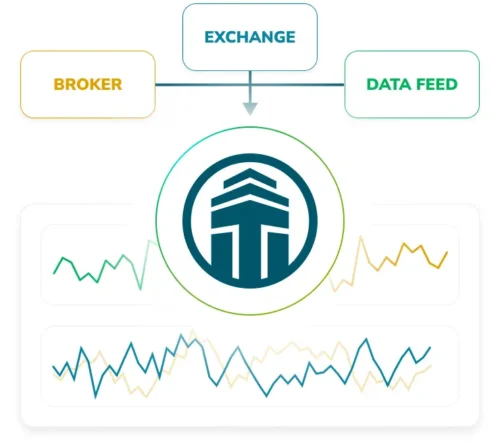
Instead, it acts as the software layer between you and the broker, exchange, or data provider you choose to connect.
I actually see that as one of the platform’s biggest advantages.
Rather than opening an account with Quantower and being locked into one ecosystem, you can connect supported services and use the same interface for charting, market analysis, order management, and execution.
The platform currently supports more than 60 connections, including brokers, crypto exchanges, data feeds, technology providers, and prop-trading providers. It can even keep several connections running simultaneously.
That gives you much more freedom to build your setup around the markets and providers you already prefer.
Just keep in mind that your broker or data provider still controls things like account services, available market data, and certain order-routing features.
Who Is Behind Quantower?
Quantower is developed by a financial software company focused on building a flexible trading environment.
I haven’t been able to locate any names or faces to attach to that company, but what stands out to me is the way the team has shaped the platform around community feedback.
That very community inspired many of Quantower’s features, which makes a lot of sense as you play with the software.
There are dozens of panels, extensive workspace controls, support for different asset classes, and an open C# API that lets more technical users develop their own indicators, strategies, and integrations.
The company also keeps official channels on YouTube, Facebook, and GitHub, giving users several places to follow updates and interact with the platform.
>> Unlock Quantower’s Advanced Trading Tools <<
How Does Quantower Work?
Quantower keeps the basic setup surprisingly simple despite having a large number of advanced tools.
 Setup and Customization
Once you install the Windows application, you connect a supported broker, exchange, or data source and start building your workspace around the markets you follow.
From there, everything revolves around panels.
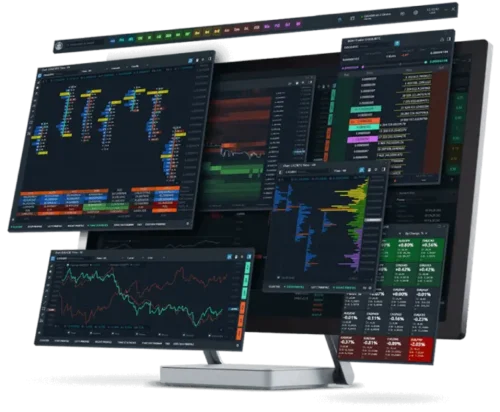
Each panel handles a specific task, such as charting, Time & Sales, market depth, DOM trading, positions, orders, news, account information, Market Replay, or options analysis. Quantower includes more than 40 trading and analytical panels in total.
I like that you are not stuck with a preset screen layout either.
It’s possible to shift panels between monitors, group them together, link them through binds or workspaces, and save them as templates.
You can also create different default settings for individual panels, which makes it much easier to build separate setups for different markets or strategies.
 Broker Connectivity and Simultaneous Connections
Quantower can work with several data providers at once, so you can analyze price changes or manage different connections inside the same environment.
More advanced users can take things further through the C# API, which supports custom indicators, automated strategies, and third-party integrations.
Once I got used to the panel-based layout, the whole platform started to make much more sense.
It gives you a central workspace, while still letting you decide which broker, market, data source, and analytical tools belong inside it.
>> Explore Quantower’s Full Feature Set <<
Quantower Features Explained: Charts, Order Flow, DOM, Options, and More
Quantower covers far more ground than a basic charting terminal, with over 40 trading and analytical panels spread across analysis, execution, portfolio management, account data, and market information.
I spent most of my time with the features that give the platform its edge, so let’s break those down one by one.
 Charts and Technical Analysis
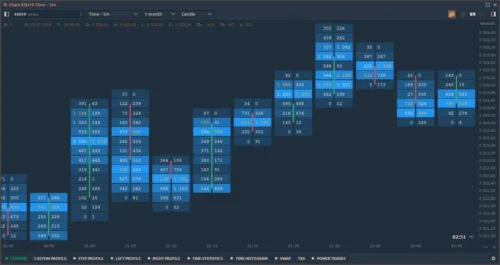
Charting is one of the easiest parts of Quantower to appreciate because there is plenty of room to shape the screen around your own analysis.
Alongside standard time-based and tick charts, you can use custom timeframes and alternative styles such as Renko, Kagi, Point & Figure, Line Break, Heikin-Ashi, Range Bars, and Volume Bars.
The platform also supports chart overlays, Fibonacci and Gann tools, harmonic patterns, moving averages, oscillators, volatility studies, and volume indicators.
Free users still receive 40+ technical indicators, while the paid plan removes limits on indicators and overlays.
 Quantower Order Flow and Volume Analysis
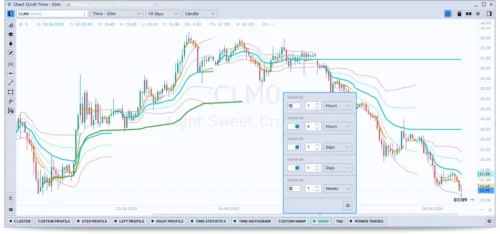
Order flow is where Quantower starts to feel much more specialized.
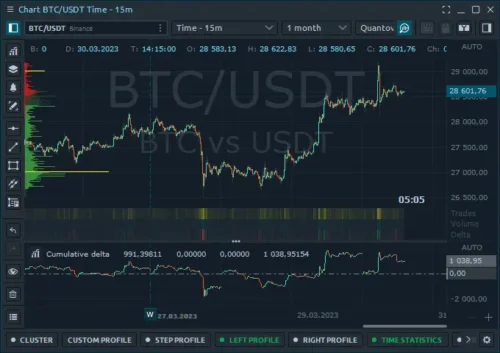
Volume analysis tools include a Cluster Chart, often called a Footprint chart, with imbalance analysis so you can inspect buying and selling activity at individual price levels.
You also get right, left, custom, and step volume profiles, along with standard and Anchored VWAP.
There is also a list of time statistics you can incorporate into your analysis from over 20 data types.
What’s really cool is that you can build out volume data as a vertical histogram, allowing you to compare info that way.
For me, this is much more useful than simply knowing how much volume traded during an entire candle.
>> Start With Quantower’s Free Platform <<
 DOM Trader and DOM Surface
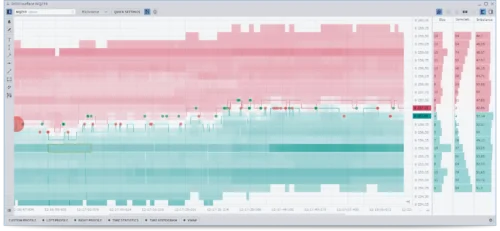
Quantower gives you two different ways to work with market depth.
DOM Trader provides the traditional ladder-style view and is even available in the free version, while DOM Surface turns changes in the order book into a visual heatmap.
That makes larger pockets of resting liquidity easier to follow as they appear, move, or disappear.
The broader platform also includes a separate Market Depth panel, Time & Sales, and order-entry tools, so depth analysis does not sit in isolation.
I like the combination because you can watch liquidity, executed trades, and actual order placement from related panels inside the same workspace.
Market Replay and Trading Simulator
Market Replay is much more useful than its name suggests because Quantower positions it as a tool for manual backtesting.
You can revisit historical market behavior and work through a setup bar by bar, rather than judging a strategy from a static chart after the fact.
Trading Simulator takes a different approach by letting you test execution against real-time market data without risking real money.
It works even with non-trading connections, and Quantower has supported symbols from different connections inside simulation environments.
That gives you a practical way to rehearse execution across futures, stocks, or crypto before going live.
>> Upgrade To Quantower All-In-One Today <<
Options Analysis
Options receive a proper analytical workspace here rather than being treated as an add-on.
The platform includes Options Desk and Option Analyzer, along with option chains, Greeks, strategy profiles, positions, and working orders.
You can study Delta, Gamma, Vega, Theta, and Rho, then use the What-If tool to see how volatility or time decay could affect a strategy.
Quantower also lets you place up to five lines on a payoff chart and overlay Greek curves on the position profile.
It’s especially helpful for multi-leg setups where understanding changing risk matters just as much as choosing the contracts.
Algorithmic Trading and C# API
The open C# API gives Quantower much more depth for anyone who wants to customize the platform beyond its standard panels.
Users can build automated strategies that monitor markets and execute live trades according to preset rules.
It’s a nice way to reduce emotional decision-making and improve consistency.
The API also supports custom technical indicators and trading assistants designed to study underlying supply and demand.
Third-party brokers, exchanges, and feeds can also be integrated, giving developers access to market data and execution through the platform.
Free users even receive API access and the Algo extension for Visual Studio.
 Various Brokers, Exchanges & Feeds
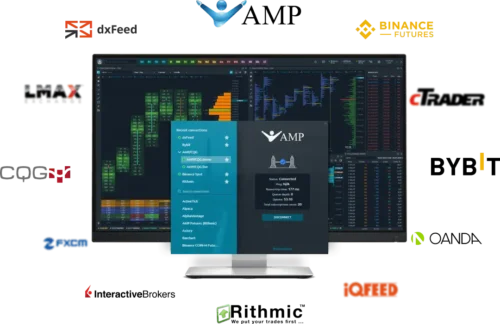
Connectivity is one of Quantower’s biggest advantages because the platform is deliberately broker-neutral.
It supports 60+ connections across brokers, crypto exchanges, data feeds, technology providers, prop-trading providers, and other services.
Depending on the connection, you can access real-time, delayed, or historical data and send orders across supported markets.
Upgrading to the All-in-One license opens the door to even more features where applicable.
>> Access Quantower’s Advanced Order Flow Tools <<
 Multi-Asset Coverage: Futures, Stocks, Options, CFDs, and Crypto
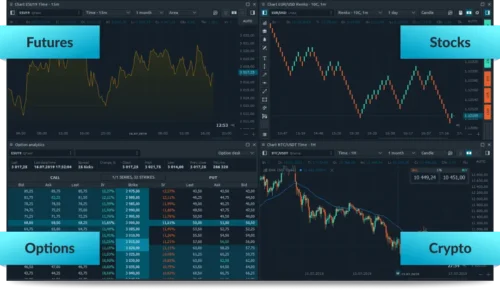
Quantower is built to handle several asset classes from the same application.
Its core coverage includes futures, stocks, options, CFDs, and cryptocurrencies.
Some panels work across several markets, while others are designed around a specific asset type.
That is why you see tools such as Crypto Balances, Option Analyzer, Forward Curve, TPO Chart, and DOM Surface sitting alongside universal panels like Chart, Watchlist, Orders, Positions, and Time & Sales.
From where I’m sitting, being able to work with all these in one location is far better than using several unrelated applications throughout the day.
 Simultaneous Connection
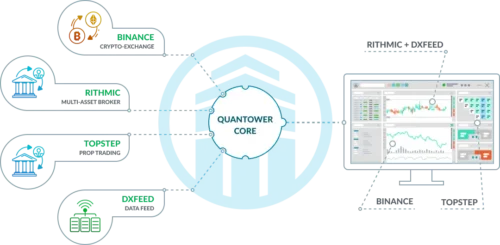
Simultaneous connections are more than a convenience feature here.
Quantower lets you connect to different brokers and data providers at the same time, then use those feeds inside one trading environment.
That means you can compare trading data from multiple sources, combine incoming data into synthetic symbols, and work with several brokers or exchanges simultaneously.
It feels really fluid to have all this in-house. After running your analysis, you can execute your order from the same system.
Plus, your preferred broker does not necessarily have to supply every piece of data you use.
Even the simulator supports instruments from different connections at once, adding another layer of flexibility when testing a setup.
>> Build Your Setup With Quantower <<
 Spreads and Synthetic Symbols
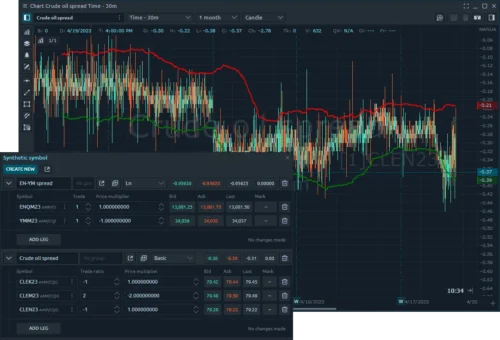
The Synthetic Symbols functionality gives Quantower a useful edge for anyone interested in spreads or relationships between instruments.
You can create synthetic and exchange-listed spreads, build a custom instrument from several legs, assign the components, and then display the finished spread on a normal chart.
Quantower has also documented synthetic setups that compare the same asset across different brokers, along with futures spreads, pairs setups, and other relative-value combinations.
Each leg can carry its own weighting, which gives you control over how the synthetic instrument is constructed.
Once created, it behaves much more like another symbol than a rough calculation sitting outside the platform.
Flexible Interface
The interface is one of the features I ended up appreciating most because Quantower does not force everyone into the same layout.
Every panel performs a separate function and can be placed on whichever screen you want.
You can organize panels into Groups, Binds, or separate workspaces, then save individual panels or complete combinations as templates.
Color linking lets several panels automatically follow the same symbol, while you can save individual defaults for different panel types.
The platform includes five color themes, providing at least some breadth for customization.
Once you have a futures, options, or crypto workspace set up properly, you can jump back into that exact arrangement instead of rebuilding it each day.
>> Explore Quantower’s DOM and Volume Tools <<
Which Markets Can You Use Quantower For?
Quantower supports a broad range of markets through compatible third-party connections.
Quantower for Futures
For me, futures are one of the strongest use cases.
Tools such as DOM, Footprint analysis, Volume Profile, Time & Sales, Market Replay, and market-depth analysis fit naturally with futures workflows.
This is where the platform’s deeper analytical features make the most sense.
Quantower for Crypto
Crypto users can connect supported exchanges and analyze multiple markets without keeping several browser interfaces open.
The platform also includes crypto balance tools and a dedicated Crypto feature package.
That multi-exchange structure could be useful for anyone who dislikes jumping between separate exchange interfaces.
Stocks and Options
Stocks receive the core charting and order-management environment, while options get dedicated analysis features.
In other words, Quantower does not force everyone into one market niche.
>> Access Quantower’s Multi-Broker Trading Platform <<
Does Quantower Include Market Data?
No, Quantower does not bundle real-time or historical market data with the platform itself.
Instead, you connect a supported broker or data feed and pull the information into Quantower from there.
Because there are so many broker and data-feed options, you’re free to choose the data source that works best for the market you follow rather than being forced into one feed.
There is one cost consideration, though.
Third-party market data fees are not included in any Quantower license, including the All-in-One plan. You’ll have to purchase those subscriptions separately when your chosen provider requires them.
The upside is that Quantower can connect to several supported providers at once, letting you compare data from different sources or separate the feed you use for analysis from the broker handling execution.
>> Unlock More Features With Quantower <<
 Is Quantower Free?

Yes, and the free version is more useful than I expected.
You can download the latest stable Windows application for free and without registration, so there is very little standing between you and trying the platform for yourself.
More importantly, this is not just an empty demo.
Free users get one active broker, exchange, or data-feed connection, time- and tick-based charts with custom periods, one chart overlay, two indicators per chart, more than 40 technical indicators, drawing tools, Chart and Mouse Trading, DOM Trader, Time & Sales, chart alerts, synthetic symbols, and multiple workspaces, templates, binds, and panel groups.
You even get access to the free C# API and the Algo extension for Visual Studio, which is generous for anyone interested in building custom indicators or strategies.
The paid side starts to look appealing when you want things like advanced chart types, unlimited indicators and overlays, simultaneous connections, Trading Simulator, Market Replay, advanced Volume Analysis, DOM Surface, or the full options toolkit.
Still, the free version is a strong entry point rather than something designed only to push you toward an upgrade.
>> Get Started With Quantower Today <<
Who Is Quantower Best For?
Quantower makes the most sense for people who want more control over their analysis and execution than a basic brokerage platform can provide.
I see the strongest fit with futures users and anyone focused on order flow.
Tools such as Cluster Charts, Volume Profiles, VWAP, Time & Sales, Market Depth, DOM Trader, and DOM Surface give you several ways to study volume and liquidity instead of relying only on conventional chart patterns.
It is also a strong option if you use multiple brokers, exchanges, or data feeds.
Simultaneous connections let you keep different sources inside one workspace, while the broker-neutral design means you are not tied to a single provider.
Options users get dedicated tools for Greeks and strategy analysis, crypto users can work across supported exchanges, and people covering several markets can keep futures, stocks, options, CFDs, and crypto inside the same environment.
More technical users should also appreciate the C# API, custom indicators, automated strategies, synthetic instruments, and spread tools.
The main group I would not put at the top of the list is someone who only wants a simple chart and occasional order entry.
Quantower can handle that, but much of what makes the platform special would go unused.
Quantower 10-Day Money-Back Guarantee

Quantower offers a 10-day money-back guarantee on initial orders, giving new customers a short window to reconsider after payment.
You’ll need to submit the refund request within that window by contacting Quantower support.
The policy does not cover lifetime licenses, so those purchases are final.
I also like that paid subscriptions do not renew automatically, leaving you in control of future purchases.
After reviewing Quantower, these are the standout strengths and the few limitations I think matter most.Quantower Pros and Cons
Pros
Cons
>> Compare Quantower Plans And Start Free <<
Quantower Track Record and Past Performance
Quantower does not publish a portfolio return, win rate, or recommendation history because it is software, not an investment advisory service.
Its own terms make clear that the platform does not recommend securities or provide investment advice, and that results from backtesting or real-time records should not be treated as a guide to future performance.
The better way to judge its track record is by adoption and product development.
Quantower has a near-perfect Trustpilot rating, while customer feedback highlights its interface, volume analysis tools, futures functionality, and multi-exchange crypto support.
The platform has also been expanding for years, including 20 major releases and 29 new trading/data connections in 2019 alone, followed by continued additions to DOM, volume analysis, brokers, exchanges, and market-data integrations.
How Much Does Quantower Cost?
Quantower offers several payment options, depending on how much of the platform you actually need.
The full All-in-One license starts at $70 per month and unlocks all available features, supported connections, and future updates.
Longer commitments bring automatic savings: 10% off for three months, 20% off for six months, and 30% off for an annual license.
A lifetime option is also available for users who want permanent access.
Quantower offers a free limited version, plus a 7-day full-featured trial before you buy.
You can also purchase individual extensions such as DOM Surface, Volume Analysis, TPO Profile Chart, Advanced Features, and Option Trading, or choose discounted bundles like Multi-Asset and Crypto if those better match your setup.
Just remember that third-party market data is not included in any Quantower license, so those fees may increase your total cost.
>> Take Quantower For A Test Drive <<
Is Quantower Worth It?
After spending time with the platform, I think Quantower is worth considering if you want more than basic charts and order entry.
Its biggest appeal is the combination of deep order-flow tools, DOM, flexible broker connections, and advanced market analysis inside one customizable workspace.
The platform makes the strongest case for futures users, multi-broker setups, and anyone who relies heavily on volume, liquidity, and market-depth data.
It also helps that you can start free and test the full feature set before paying.
Multiple price points speak to different users as well, and you should be well aware of what the platform can do before ever committing long-term.
My Quantower review comes down to value: Quantower offers enough depth and flexibility to justify the cost for active users, while simpler users can stick with the free version until they need more.



 Tags:
Tags: