

Market professionals have relied on powerful research terminals for decades, but the steep cost has kept many of us regular folks firmly locked out.
Godel Terminal believes there’s a better way.
Its modern take on a Bloomberg-style platform promises fast data and accessible pricing that could reshape how we access game-changing data.
In this Godel Terminal review, I take a closer look at whether this new approach truly lives up to its claims.
>> Try Godel Terminal by DL Software Today <<
 Quick Verdict: My Take on Godel Terminal

Godel Terminal comes across as a fast, well-built, and surprisingly affordable alternative to legacy financial terminals.
It isn’t a full Bloomberg replacement, but it delivers the core research tools most professionals need at a fraction of the price, and with far fewer barriers to getting started.
Best For
- Analysts and portfolio managers who want high-speed data, charts, and news without paying five-figure fees
- Professionals who prefer a clean, keyboard-driven workflow
- Smaller funds, registered analysts, and trading enthusiasts looking for institutional-style tools on a modern budget
Not Ideal For
- Users who dislike command-line or terminal-style interfaces
- Folks who rely heavily on Bloomberg-exclusive integrations or messaging
- Anyone expecting a complete management system or multi-asset institutional ecosystem
Would I Personally Use Godel Terminal?
Yes. The speed, simplicity, and aggressive pricing make it an easy everyday research terminal for anyone who values efficiency without the legacy cost structure.
>> Unlock Godel Terminal Access Now <<
What Is Godel Terminal?
Godel Terminal is a modern, browser-based financial terminal built for professionals who want Wall Street-level speed without the traditional cost barrier.
It’s developed by DL Software Inc., and the platform pulls real-time market data, global news, filings, charts, analytics, and company fundamentals into a single workspace you can access from any device.
The product line revolves around one idea: deliver the core power of a Bloomberg-style terminal through a clean interface and a fast command system that responds in under a tenth of a second.
I was originally drawn to it because it removes the usual hardware requirements, setup complexity, and five-figure subscription fees that have kept the majority of us stuck on the sidelines.
Instead, you get a streamlined terminal that loads instantly, covers global markets, supports modern workflows, and feels approachable even if you’ve never used an enterprise research platform before.
>> Start Your Godel Terminal Pro Trial <<
Who Owns and Runs Godel Terminal?
Godel Terminal is built by DL Software Inc., which I can only assume is a fast-growing tech team focused on making institutional research tools accessible to everyday market professionals.
Martin Shkreli is one of the co-founders, according to LinkedIn. He’s an entrepreneur with several companies under his belt, three of which fall under the DL Software umbrella.
The company recently completed a $5 million seed investment round, signaling what could be big things on the horizon.
This also bodes well for Godel Terminal and its other projects.
Is Godel Terminal Legit?
Yeah, Godel Terminal has gained real traction because the platform performs at a level professionals expect, delivering sub-100ms responses and continuous upgrades that reflect active, experienced development.
It works as intended, but the platform is still very new, at least according to the changelog.
What stood out to me was the 20,000 verified high-value contacts it currently holds, despite what I believe is a short window of operation.
When you combine that with transparent policies, real funding, and consistent adoption, Godel Terminal stands out as a credible, serious platform deserving of attention.
>> Join DL Software’s Godel Terminal Now <<
How Does Godel Terminal Work?
 A Fast, Browser-Based Terminal That Loads in Seconds
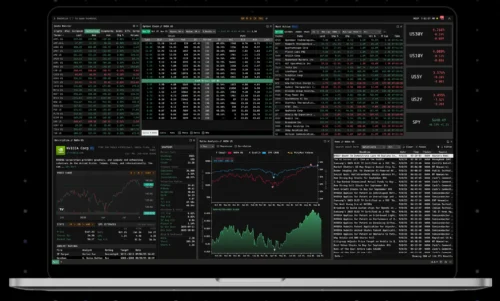
Godel Terminal runs entirely in your browser, so there’s no installation or specialized hardware involved.
You log in, and the terminal opens as a clean, multi-panel workspace that feels surprisingly quick for a web app.
Most commands respond in under a tenth of a second, which gives it that familiar institutional feel without the usual friction or setup.
This is huge for me, since I don’t need a heavy setup and I can use it wherever I want.
I shudder at the days of massive rigs trying to crank out data and how slow the process was.
A Command-Driven Workflow That Keeps Everything Smooth
The platform uses a streamlined command interface where you enter a ticker and a short code to call up prices, charts, news, ownership data, filings, or time and sales.
It mirrors the Bloomberg-style workflow many professionals love to use, but with a learning curve even I can get behind.
I can call up different windows with a few keyboard presses, and as long as I remember the hotkeys, I can get to certain sections as fast as my fingers will move.
In my opinion, anyone who prefers a fast, keyboard-first way of working will feel at home quickly.
A Unified Workspace for Real-Time Research and Monitoring
Inside the terminal, everything runs from one place: real-time quotes, intraday charts, global news streams, SEC filings, company financials, and customizable watchlists.
I have several windows open at once that capture the platform’s chat, stock quotes, painfully fast news updates, and some charting for tickers I’m interested in.
There’s even a way to save layouts so it loads up exactly how I left it, making this a huge draw.
Instead of bouncing between charting tools, news feeds, and research sites, Godel keeps everything together with consistent formatting and near-instant loading.
It feels modern and efficient, especially for anyone who tracks markets throughout the day and needs information without delay.
>> Upgrade to Godel Terminal Pro Here <<
Godel Terminal Review: All The Core Features Explained
These features really caught my attention when reviewing the platform:
Institutional-Grade Data Without the Institutional Price Tag
 Godel Terminal delivers real-time equities, indices, FX, and crypto data through a fast browser interface, giving access to institutional-style feeds without the hard costs or hardware that usually come with them.

The platform surfaces core fundamentals, financials, descriptions, filings, and ownership data in one place, making it practical for users who want the strength of a traditional data terminal but at a far more accessible monthly subscription.
Speed That Outperforms Legacy Terminals
The platform’s biggest advantage is speed. Most queries return data in under 100 milliseconds, which is unusually fast for a web-based terminal.  This responsiveness becomes noticeable when switching between charts, news, filings, or analytics throughout the day.
You can literally have the information you need when you need it, a huge boon to services that can delay data to the tune of minutes.
I appreciate how little lag exists between commands, allowing the terminal to maintain the rhythm and flow of a desktop system without the overhead typically associated with one.
One Terminal for Global Markets, Research, News & Data
Godel consolidates global equities, international indices, SEC filings, company fundamentals, and market activity into a single workspace.
 The terminal covers U.S. markets along with major global exchanges, allowing you to stay centered in one environment instead of juggling multiple tabs or data services.
This simple approach does wonders, especially when I don’t have the time to sift through noise.
Monitoring and discovery happen inside one system, reducing friction and making it easier to keep a consistent workflow throughout the day.
Real-Time Global News Engine
The news component pulls from global wires, press releases, and regulatory updates, returning results almost instantly for any ticker or topic.
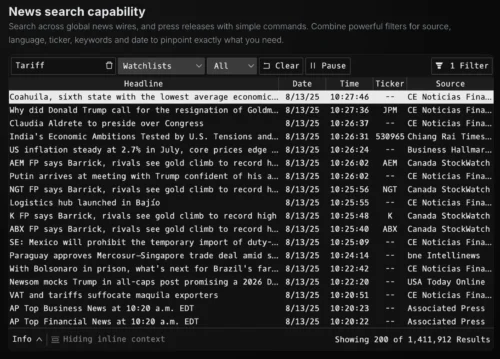 Godel also organizes headlines by source, language, or time, giving the user a clearer sense of what’s moving a company at any moment.
The density of coverage stands out, with more articles surfaced per name than typical retail platforms, making it valuable for anyone who tracks catalysts or fast-moving developments.
Advanced Charting & Technical Tools
Charting is powered by Nasdaq data and rendered with TradingView technology, offering a familiar, high-quality interface for technical analysis.
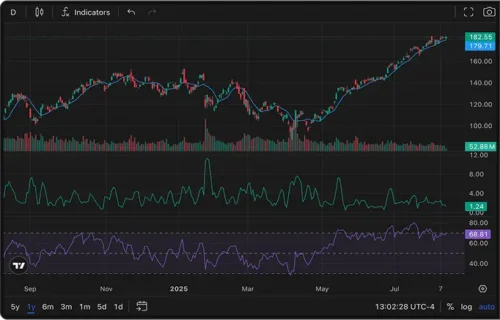 It’s possible to switch between intraday and long-term history, apply indicators, or compare multiple securities with clean visuals.
The terminal’s commands make charting fast to load, which is helpful when reviewing several names at once.
Tapping the tilde (`) key brings up a ton of options you can pick from or access with another button press, removing the complication of charting I’ve seen in other systems.
Command Line Interface (CLI) Capabilities
Godel includes a streamlined command-line system that mirrors the speed and structure of older terminals but with a lighter learning curve.
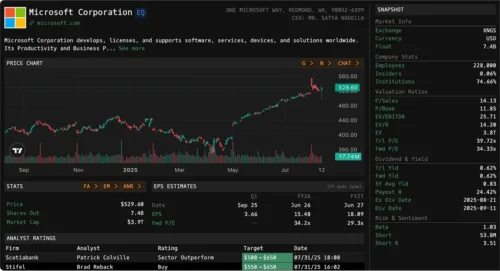 Commands like DES, FOCUS, TAS, and HDS pull up descriptions, quotes, trades, and ownership snapshots within a fraction of a second.
The nature of this setup saves a lot of time, especially as you learn what the keystrokes are. I love not having to dig through multiple menus to find what I am looking for.
Quote Monitor & Global Watchlists
The Quote Monitor offers a live grid for tracking tickers across U.S. and international markets, updating prices and key fields in real time. 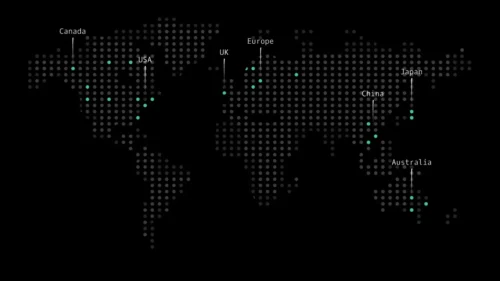 You can create multiple watchlists, load large sets of symbols, and arrange screens in a flexible layout that mirrors traditional terminals.
Recent updates improved global intraday coverage and added more responsive data handling, making the monitor reliable for anyone managing multiple positions or tracking market themes throughout the day.
20,000+ Verified High-Value Contacts
One unique feature is Godel’s built-in database of more than 20,000 verified high-value contacts, aimed at helping professionals expand their network or investor reach.
This includes allocators and industry figures who may be relevant to emerging managers or firms looking to scale.
While not a replacement for dedicated CRM tools, it adds a practical layer of value by giving each of us access to connections we might not easily find through typical financial research platforms.
>> Experience Godel Terminal’s Speed Today <<
Pros and Cons
There’s a lot that goes into Godel Terminal, but it’s not perfect. Here are my pros and cons:
Pros
- Very fast sub-100ms data speeds
- Modern Bloomberg-style workflow
- Strong global news coverage
- Excellent real-time charting
- Affordable compared to legacy terminals
- Easy browser access anywhere
- Active development and updates
- Useful institutional contact database
Cons
- Requires comfort with command workflow
- Lacks Bloomberg-exclusive integrations
- Smaller ecosystem than legacy terminals
- Limited advanced portfolio tools
How Much Does Godel Terminal Cost?
Godel Terminal keeps its pricing simple, which is refreshing compared to the five-figure contracts most legacy terminals require.
The platform currently offers a free tier that lets you explore the core interface before upgrading. Access is obviously quite limited, but it’s a good way to see what Godel can do.
Its Pro plan costs $80 per month, and it unlocks full access to real-time data, charts, news, analytics, fundamentals, SEC filings, ownership information, and global watchlists.
FINRA-registered users pay an additional $40 monthly surcharge, bringing their total to $120.
There’s a referral program as well, where subscribers earn recurring commissions for bringing new users on board.
Spending just $80 a month for all this information feels like a steal, even if it understandably falls short of what Bloomberg can do. I simply don’t have the means to pay quintuple-digits.
>> Get Godel Terminal for Your Workflow <<
Who Is Godel Terminal Best For?
Godel Terminal fits the mold well for anyone valuing speed and research tools without paying legacy terminal prices.
It works well for analysts and portfolio managers who rely on fast charts, news, filings, and ownership data throughout the day, and it’s a strong option for RIAs, family offices, and smaller funds that need reliable market coverage but prefer a modern, lightweight system over a $25,000+ per seat setup.
Active equity teams and independent pros will appreciate the command-driven workflow, especially if they already use Bloomberg-style shortcuts.
It’s also a practical upgrade for advanced retail users who have outgrown basic charting sites and want a more serious workspace.
While not a full replacement for firms tied to Bloomberg-specific integrations, it delivers more than enough for most research-heavy workflows.
>> Access Godel Terminal’s Pro Tools Now <<
Godel Terminal vs. Bloomberg, Refinitiv & Koyfin
Bloomberg Terminal Comparison
Bloomberg is still the “gold standard” for full-stack market data, analytics, and messaging, but it comes at a steep price, typically around $25,000–$30,000 per user per year, with single-terminal subscribers often paying the most.
Where Bloomberg wins:
- Massive data breadth across all asset classes
- Deep analytics, portfolio tools, and bespoke functions
- In-terminal messaging (IB) used across global finance
Where Godel Terminal pushes back:
- Cost – a couple hundred dollars a month vs tens of thousands per year
- Speed – sub-100ms responses for news, quotes, and charts
- Modern delivery – pure web app, no special routers or hardware
For many mid-tier users, the question is not “Is Godel as big as Bloomberg?” but “Do I need to pay Bloomberg money to do the 10 things I actually use?” If your workflow is mostly quotes, charts, news, filings, and some ownership data, Godel Terminal can cover that at a tiny fraction of the price.
Refinitiv Eikon Comparison
Refinitiv Eikon is often framed as Bloomberg’s main rival, with similar coverage across asset classes and a big emphasis on global markets.
Pricing is usually quoted around $22,000 per year, with stripped-down variants as low as $3,600 for narrower use.
Compared to Eikon, Godel Terminal:
- Focuses more on speed and a terminal-style CLI
- Keeps pricing simple and accessible
- Leans on TradingView for chart rendering, which many users already know
If you need specialized datasets that sit deep inside the Refinitiv ecosystem, you’re still going to lean on Eikon.
If your firm just needs fast global equities, charts, news, filings, and some FX/crypto, Godel Terminal is easier to swallow from a budget and onboarding standpoint.
Koyfin & Other Modern Tools
Koyfin is a great example of a modern, browser-based data tool. It offers strong charting, screeners, and dashboards, with pricing that ranges from free to around $39–$79/month for most users, and higher tiers for advisors.
Koyfin excels at:
- Visual dashboards
- Fundamental and macro overlays
- Long-term charting and factor analysis
Where Godel Terminal is different:
- Heavier command-line focus rather than dashboard focus
- Real-time Time & Sales, Most Active, and other trade-level tools
- Integration with Nasdaq real-time data and EDGAR filings
- Features like the 20,000+ contact network and live Wojak sentiment index (WJI) baked into the terminal experience
If you want a data-rich “research dashboard,” Koyfin can be enough. If you want a terminal that feels closer to Bloomberg, with CLI commands like DES, TAS, HDS, and HMS, Godel Terminal is the better fit.
>> Claim Your Godel Terminal Access Now <<
Is Godel Terminal Worth It?
After spending time with the platform and going through everything highlighted in this Godel Terminal review, I think it offers strong value for anyone who needs fast, reliable market data without committing to a legacy terminal budget.
The speed alone sets it apart, and the fact that it delivers real-time charts, news, filings, and analytics inside a clean browser workspace makes it easy to adopt.
It won’t replace Bloomberg for firms tied to custom integrations or deep multi-asset workflows, but it handles the core research tasks most professionals rely on every day.
When you weigh its responsiveness, modern interface, frequent updates, and accessible pricing, Godel Terminal feels like a practical, forward-leaning choice for analysts and teams who want institutional-quality tools without paying institutional costs.
>> Activate Your Godel Terminal Account <<
Godel Terminal FAQs
Is Godel Terminal easy to use?
Yes. The browser-based layout and simple command system make it approachable, even for users who haven’t worked with a Bloomberg-style terminal before.
Does Godel Terminal provide real-time market data?
It does. The platform delivers sub-100ms quotes, charts, news, and filings, giving analysts and professionals near-instant access to the information they rely on daily.
Can Godel Terminal replace Bloomberg or Refinitiv?
For core research tasks, it can. Firms needing advanced integrations, OMS tools, or Bloomberg-specific functions will still maintain their legacy terminals alongside Godel.
Does Godel Terminal offer a free plan?
Yes. The free tier lets you explore the interface, while the Pro plan unlocks full real-time data, analytics, fundamentals, and global coverage.

 Tags:
Tags: