

We’re all aware of the wealth-building potential investing brings, but few of us have the time required to hunt down opportunities and really position ourselves for success.
That’s where Stock Rover comes in. The platform claims to save you time researching so you can make accurate assessments and actually grow your financial foundation.
The question is, does it hold up when put to the test?
In this Stock Rover review, I’ll walk you through what I discovered after seeing what it can do.
>> Try Stock Rover Premium Today <<
What Is Stock Rover?
Stock Rover is a stock screener and stock market research platform designed with a massive slew of tools to help you navigate market changes. It aggregates a vast collection of data into a centralized research platform, making it easy for users to find what they need.
 Essentially, Stock Rover is a hub for all things stock market, and its tools provide quick insights that would take hours to find without it.
Some of its stock research tools include:
- Detailed stock reports
- Stock ratings
- Portfolio analysis
- Portfolio management
- And much more
With so many robust research features, Stock Rover could be a powerful addition to your trading toolbox and investment strategy.
Even better, Stock Rover supports brokerage integration, but you can also set up your portfolio manually.
Let’s dive deeper to learn more about this platform’s full capabilities.
Is Stock Rover Legit?
Stock Rover is a legit screener and research hub that provides you with valuable data that could help improve trading outcomes.
I can count on one hand the number of other platforms that provide such an extensive catalog of functions and features.
These aren’t pointless additions to bloat its set list. Each feature provided by this stock screener feels very deliberate: it’s not just tacking on half-baked tools to check boxes. What the platform does, it does exceedingly well.
Is Stock Rover Safe?
The platform stores all your data on climate-controlled, secure encrypted servers, and no one person has access to your personal information.
Here’s a quote from the Stock Rover FAQ:
“Our data centers are locked and accessible to only authorized Stock Rover personnel. Stock Rover servers are protected by multiple layers of firewalls…”
Stock Rover is not a trading app and has no control over your money, so you don’t have to worry about hackers cleaning out your account. It’s simply a stock screener and research platform that tracks stock market data.
The platform says that it doesn’t sell your email address to third parties, either: it only uses your email to communicate with you about your account.
>> Already sold? sign up now <<
Is There a Stock Rover App for Mobile or Tablet?
Stock Rover is an app that can run on desktop, mobile, and tablet. But it does not have apps specifically for each device. So you can’t download a Stock Rover App from Google Play or the App Store.
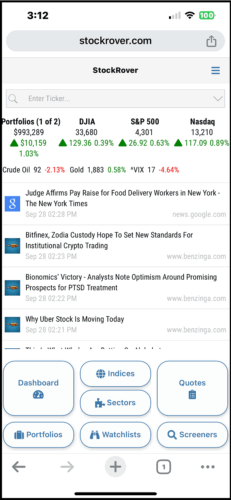 That being said, if you log into Stock Rover using a phone or tablet, there’s an optimized UI for each device.
I didn’t find this ideal, but it gets the job done when you’re out and need to access your data.
Does Stock Rover Provide Real-Time Market Data?
Since the markets are constantly changing, it’s important to be in the know with the latest information at a moment’s notice. Stock Rover understands this and works hard to keep its numbers accurate.
The platform updates price quotes on stocks from the NYSE and NASDAQ about as quickly as any platform can. There’s usually just a minimal delay of less than a minute when pulling new data from the markets.
For more obscure stocks, the delay is a bit longer. If you’re checking out happenings outside the major exchanges, expect the data to be about five minutes old. Canadian stocks and micro-caps are delayed about 15 minutes.
Premium and Premium Plus members can enable the Auto Refresh feature, which will update information in the Stock Rover display as often as every minute.
How Does Stock Rover Work?
In my opinion, it’s very easy to compile stock data and analyze investment research on Stock Rover.
The platform has pricing data for 40,000 stocks on these North American exchanges:
- New York Stock Exchange (NYSE)
- NASDAQ
- NYSE Alternext US (formerly American Stock Exchange)
- NYSE ARCA (formerly Pacific Exchange)
- Toronto Stock Exchange
- TSX Venture Exchange
- NEO Exchange
- CNQ Exchange
- BATS Exchange
It also provides stock information on two over-the-counter (OTC) boards:
- OTCBB
- OTCPK
Depending on your subscription level, there are tons of exceptional portfolio tools at your fingertips, including portfolio analytics, but we’ll get into that a little later.
You can easily access any of these tools through the dashboard. It’s marked in red (on the left side):
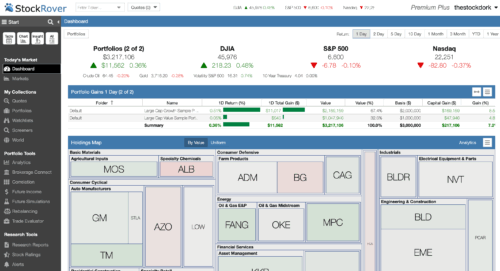 If you’re tired of messy UIs and want an organized platform, Stock Rover is a great option.
You can also remove unwanted sections from the dashboard. This is nice if you’re using other services to track portfolios and don’t want wasted space for a feature you won’t use.
Also, Stock Rover focuses entirely on research applications, so users cannot execute trades directly through the platform. Some competing screeners let you do both, but you’re typically limited to using a few brokers.
You can use Stock Rover to:
- Perform stock research and correlation analysis
- Analyze market data and historical data
- Screen for potential trades
- Brush up on market-moving news
The Stock Rover platform also includes a fully customizable portfolio tool that you can set up to track holdings, follow your favorite stocks, and much more.
There is a free account, but you will need to tap into the premium plans to get the most functionality.
>> Join Stock Rover for Free and Enjoy 14 Days of Premium Plus <<
Stock Rover Features Breakdown
Stock Rover offers a range of features, including:
- Stock Screening Tools
- Stock and ETF Comparisons
- Portfolio Management & Watchlists
- Alerts, News & Market Data
- Displays (Table, Chart, and Insight Mode)
- Charting & Analysis Tools
- Stock and ETF Comparison
- Stock Rover Ratings
- Research Reports & Insights
- Brokerage Integration
- Quick Start Guide
- Help and Support
- Trade Evaluator
- Mobile UI
Keep reading my Stock Rover review to find out more about each one.
Stock Screening Tools
Stock Rover’s built-in stock screener is a great resource for identifying new trade and investment ideas.
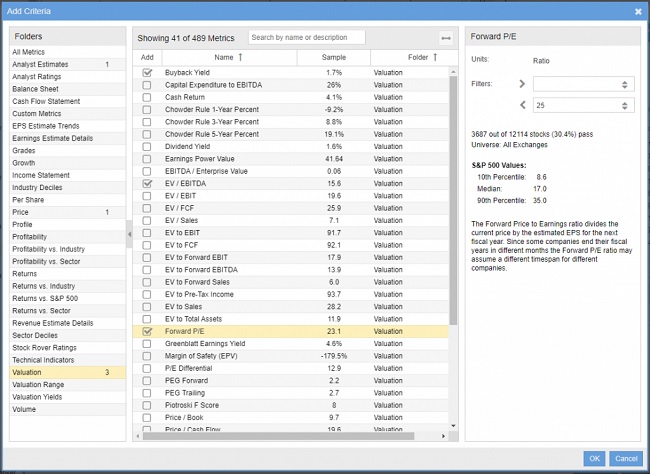 The screener tool has several default options that can target stocks based on several attributes like analyst ratings. From there, you’ll have more than 150 you can import from the Stock Rover Library. Use these as is, edit them, or create your own from scratch.
Examples of targetable categories include fair value, margin of safety, growth stocks, dividend growth, and more. The screener pours through a vast catalog of historical data to find opportunities that fit your criteria.
I’ve spent a lot of time setting up Stock Rover Stock Screens since they’re so customizable, and you’ll likely want to do the same. You can even apply a second screen layer on top of the first for a truly refined search.
With the Premium Stock Rover subscription, you can also access more than 700 indicators and a wide array of other analysis tools.
Stock Rover’s screener uses real-time statistics and fundamental data, so you can screen stocks using the most up-to-date information.
The team’s software engineers even included a logic function, which allows you to design custom equations to find the perfect stocks for your trading style.
Portfolio Management & Watchlists
After you’ve used the screener tools to locate interesting stocks, Stock Rover lets you place those picks in any number of portfolios you’d like. You’re then free to compare your portfolios to each other or benchmarks like the S&P 500 to gauge performance.
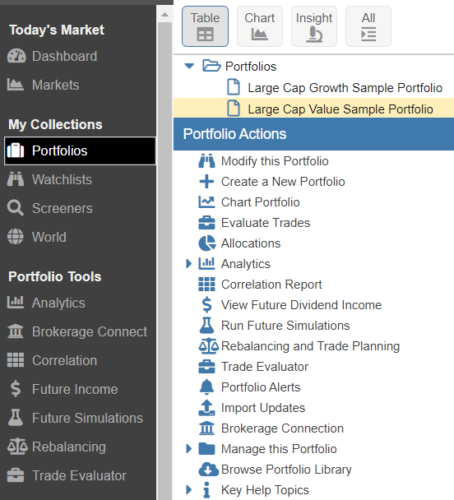 Portfolio tools don’t stop there. Alongside those analytics, it’s possible to view the correlation between individual holdings within or throw in extra tickers for additional analysis. There’s also a rebalancing and planning tool for testing potential trades.
One of my favorite features is the future income tab, where you can track potential payouts from dividends. While thinking ahead, future simulations play out potential long-term expected growth under a variety of applicable scenarios.
Watchlists
If you have a list of stocks that you’re looking to keep an eye on, you can effortlessly create a dedicated watchlist.
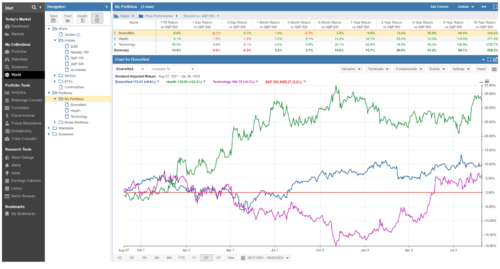 There are a few ways to set these up, but the easiest is probably creating one through the navigation panel. You can run multiple lists to track and group stock categories, such as value, dividend, momentum, or other metrics that tickle your fancy.
It’s possible to add multiple stocks at once by either separating your tickers with commas or spaces, saving tons of time in the process.
This feature also works well with charts, allowing you to view and compare your lists against stocks, industries, portfolios, indices, and other watchlists.
>> Already sold on Stock Rover? Click here to sign up today! <<
Alerts
Stock Rover issues alerts to you through text or email when an event meets your preset criteria.
For example, you receive an alert if a stock or ETF exceeds or plummets below a predetermined price point that you get in a watchlist.
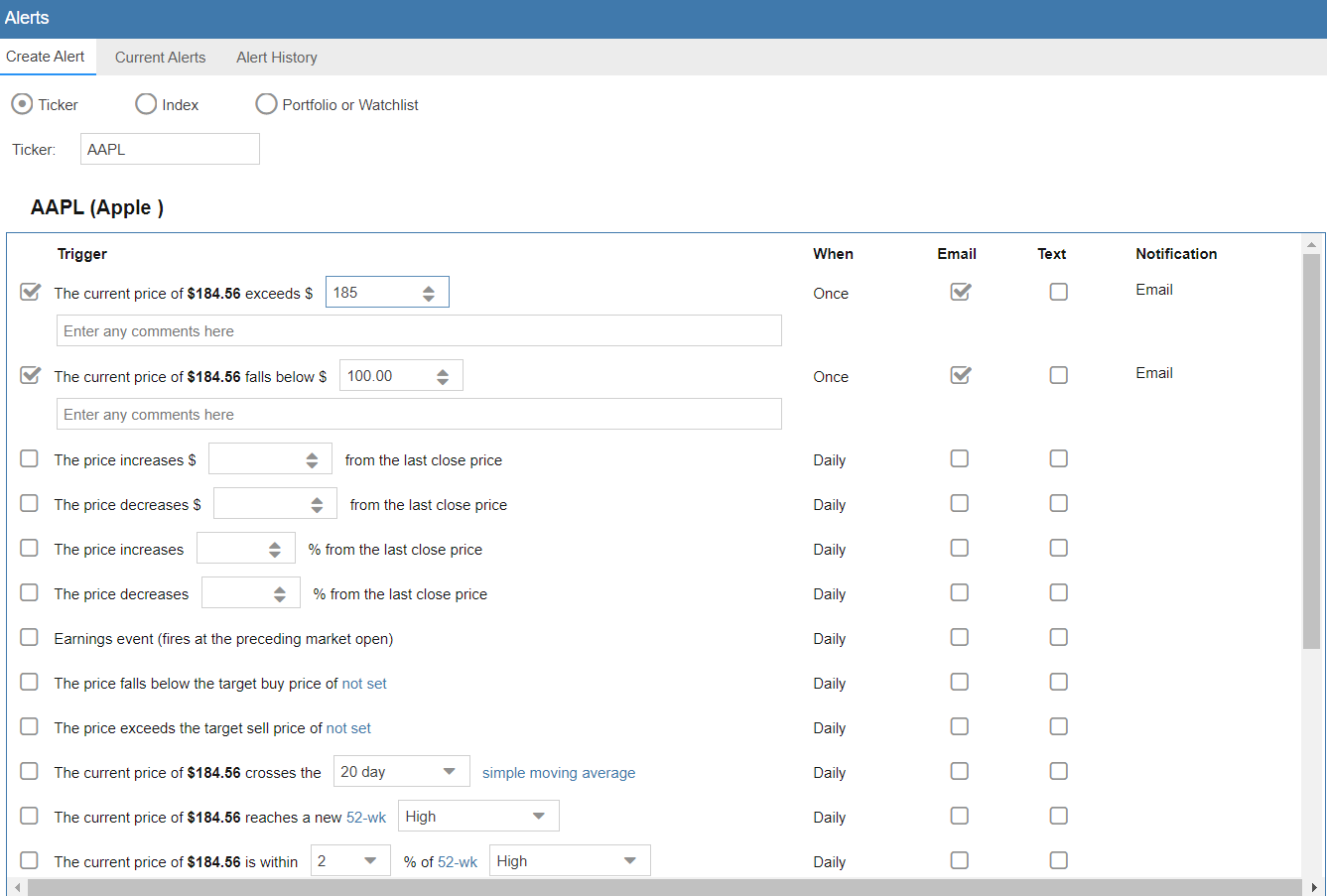 This is a handy feature for folks on the go who don’t want to spend their entire day with their eyes glued to a screen.
Some alerts you can set up are:
- Price movements passing thresholds
- Earnings surprise events
- Prices nearing 52-week highs or lows
- P/E shifts
- And more
Most screeners have some sort of alerts baked into the formula, but Stock Rovers’ options are surprisingly flexible.
That gets huge bonus points from me, and you can either set them up through your portfolio or watchlists. Heck, it’s even possible to track indices like the S&P 500.
News and Press
News and press feature displays the latest news on the markets and stocks in your portfolio.
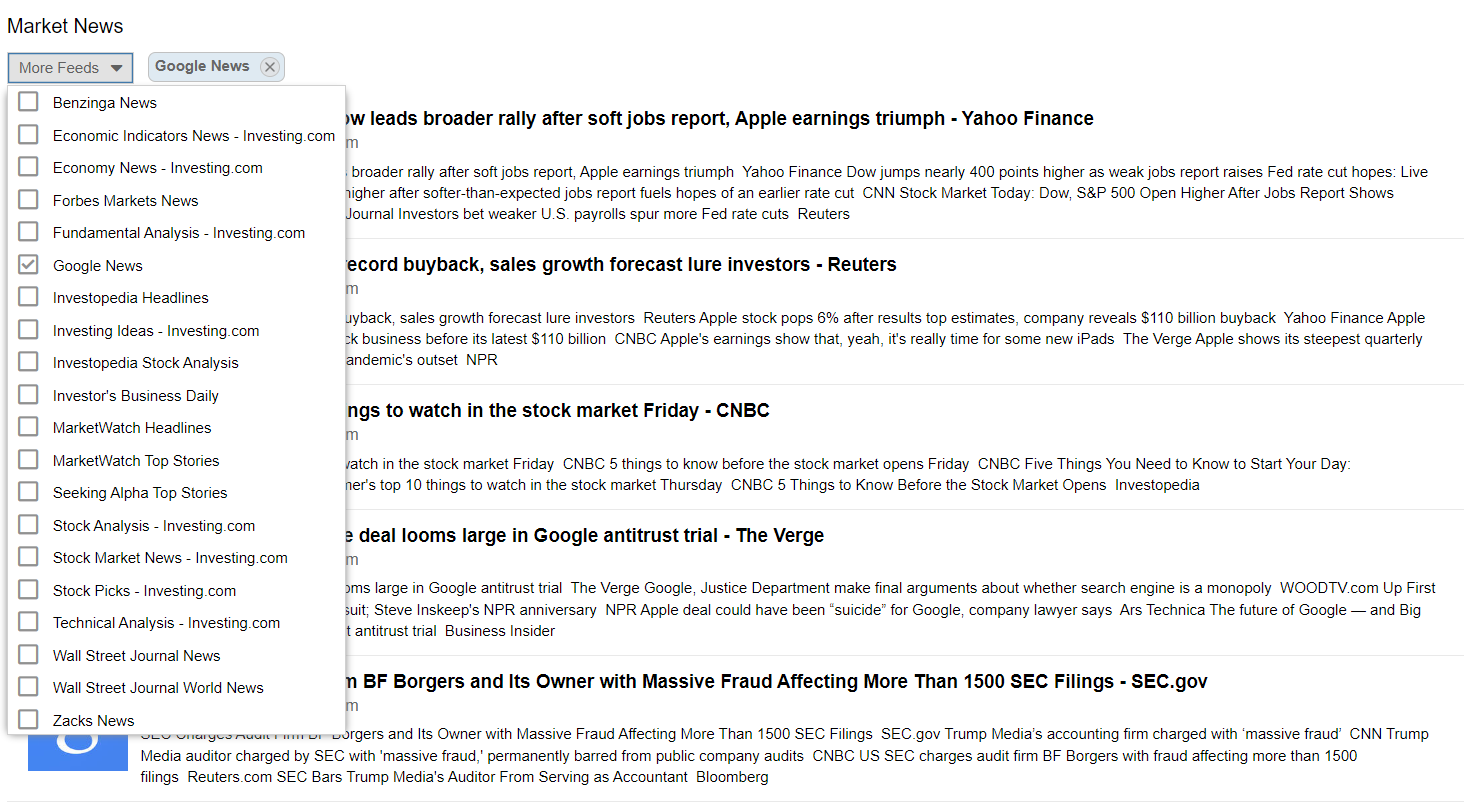 This is an excellent addition for folks looking for an all-in-one platform that doesn’t force you to split your attention between software or swap through browser tabs while trying to keep up on the latest happenings.
You can customize your feed by using the dropdown menu to add or remove news from specific sources.
Some feeds you can tap into include:
- Benzinga
- Zacks
- Seeking Alpha
- Investopedia
- Forbes
- And much more
Displays
Stock Rover has three panels you can use to provide different insights and visualizations of data for your stocks.
These modes are:
- Table
- Chart
- Insight
They have different indicators that you can sift through to find the exact data point you’re looking for.
As I mentioned earlier, this level of organization plays a major role in the platform’s usability. Stock research platforms aren’t exactly known for uncluttered UIs, so this is a big plus for Stock Rover.
Table Mode
Table Mode is a good option for comparing multiple stocks. This view allows users to sort search elements using a wide selection of market data, including fundamental and technical analysis indicators, and more.
You can use Table Mode to organize your stock research into a convenient spreadsheet-like display. This makes it easy to compare different stocks across multiple categories.
This particular display also allows you to incorporate data from the Stock Rover library, which includes info from balance sheets, financial statements, historical data, and more.
You can sort using analyst rankings, cash flow, dividend yields, and other statistics. For example, you can search stocks and exchange-traded funds by their returns versus the S&P 500.
This feature also allows you to create custom views to fine-tune each table to your preference.
Chart Mode
Stock Rover’s Chart Mode comes loaded with useful drawing tools, chart overlays, built-in technical analysis indicators, and much more.
This mode offers a wide array of options, including technical and fundamental analysis indicators.
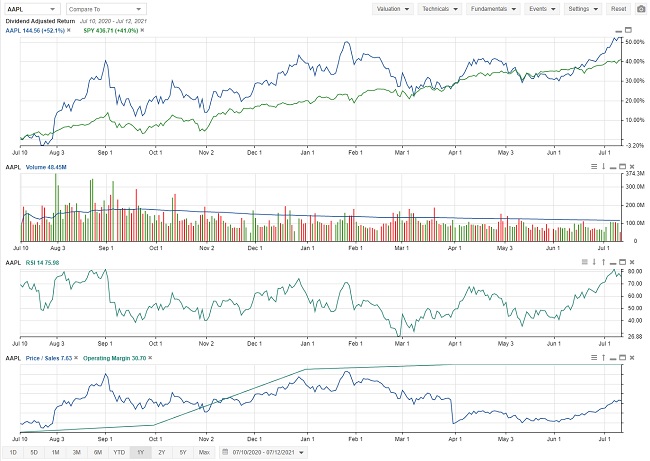 You can customize the chart display to show candlesticks, mountain graphs, line charts, and more. Available indicators include moving averages, MACD, RSI, and other popular options.
Chart mode is the best view for conducting chart-based technical analysis and analyzing price trends.
If you favor technical investing strategies, you will probably use this view often.
Charting & Analysis Tools
Charting is arguably Stock Rover’s strongest investment tool in my eyes, and probably the area I spend the most time in.
From the chart view mode, you can adjust the timeline back decades and set up as many technical indicators as you want.
With the premium subscription, you can access thousands of indicators, including moving averages, MACD, and Bollinger Bands.
Chart data updates continuously during the day. Since you can plot multiple securities on the same chart, it’s super easy to compare performance regarding various technical indicators.
There are no restrictions on plotting time against price, either: you can use any metric you’d like to plot the chart.
Stock Rover’s customizable charts are a unique and useful feature that makes conducting research much more streamlined and efficient.
>> Access Stock Rovers Advanced charting tools <<
Insight Mode
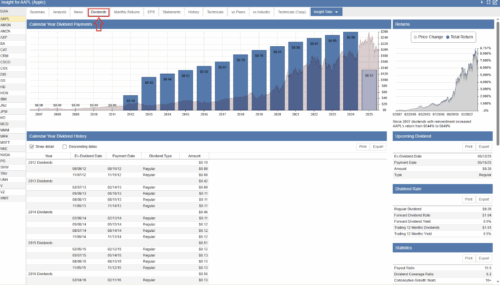
Insight Mode breaks down individual securities into an easy-to-read snapshot report for quick reference.
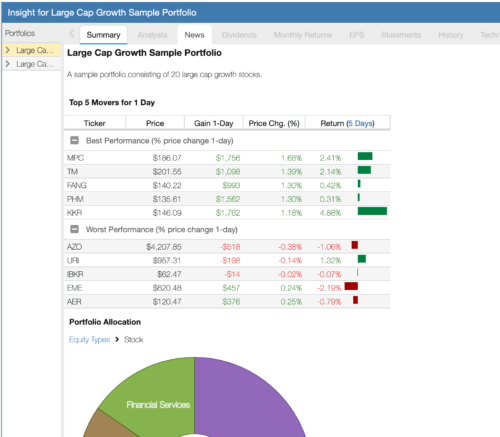 The reports produced by Stock Rover’s Insight Panel combine everything you need to know about a particular stock into one convenient one-page summary.
This view shows a lot of information at once, but don’t be intimidated.
At a glance, you’ll get info on:
- Company news
- Dividend analysis
- Financial statements
- Earnings transcripts
- Analyst ratings
- Peers and industry comparison
Also, Stock Rover clearly labels and explains each section, which makes it much easier to take in all the collected data.
Stock and ETF Comparison
This stock research tool lets you conduct side-by-side investment analysis on individual stocks using any combination of criteria and metrics you want.
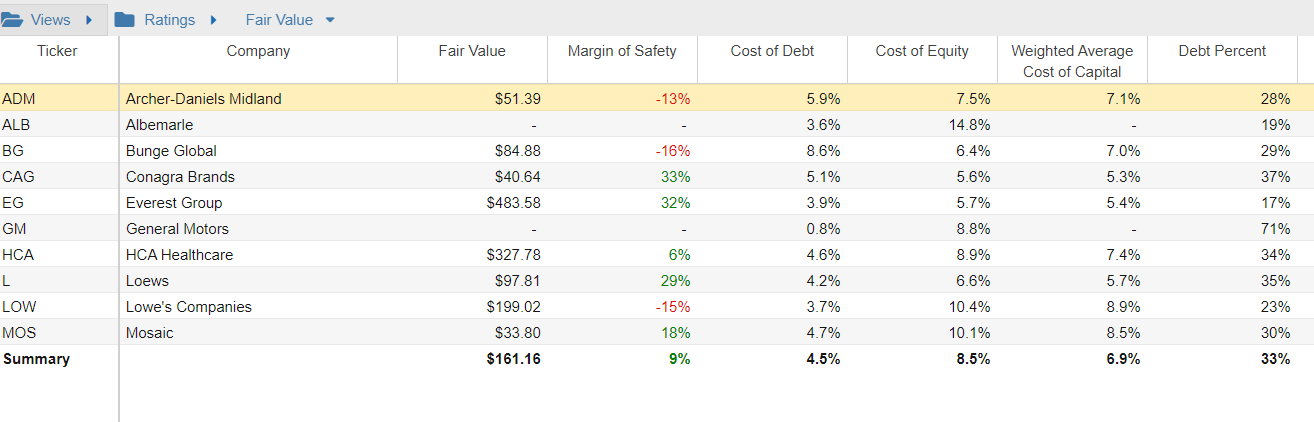
You’ll get to it through the Table view, offering an exceptionally simple UI that’s packed with rich data insights.
I love how quickly you can arrange and organize the data with just a few clicks, and Stock Rover does the rest. The stock comparison tool is set up somewhat like Microsoft Excel and can integrate with popular indices and watch lists.
The outstanding breadth and depth of these comparison tools are overwhelming at first, but once you get used to them, you’ll realize how useful and intuitive they can be.
Stock Rover Ratings
Securities also have Stock Rover ratings that provide quick insights into potential investments at a glance.
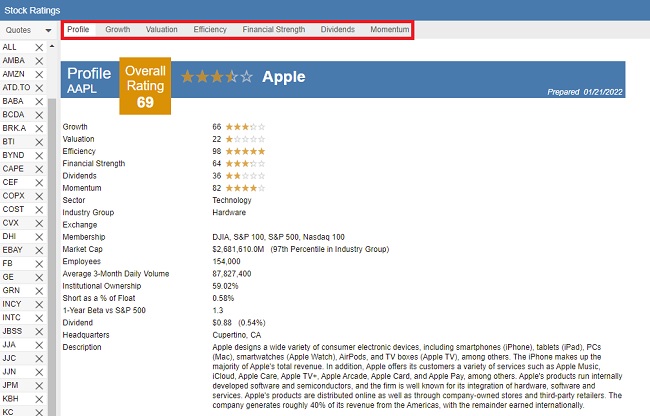
It’s an exceptional, intuitive system that aggregates a wealth of data and compares it to other stocks.
Here are some of the ratings based on stock comparison:
- Dividends Rating vs. Peers
- Efficiency Rating vs. Peers
- Financial Strength Rating vs. Peers
- Growth Rating vs. Peers
- Momentum Rating vs. Peers
- Overall Rating vs. Peers
- Valuation Rating vs. Peers
The ratings feature is fantastic. The one drawback is that it’s only accessible through the Premium Plus plan.
>> Get started with Stock Rover here! <<
Research Reports & Insights
Stock Rover research reports allow users to export detailed information on stocks and ETFs that are tracked by the platform.
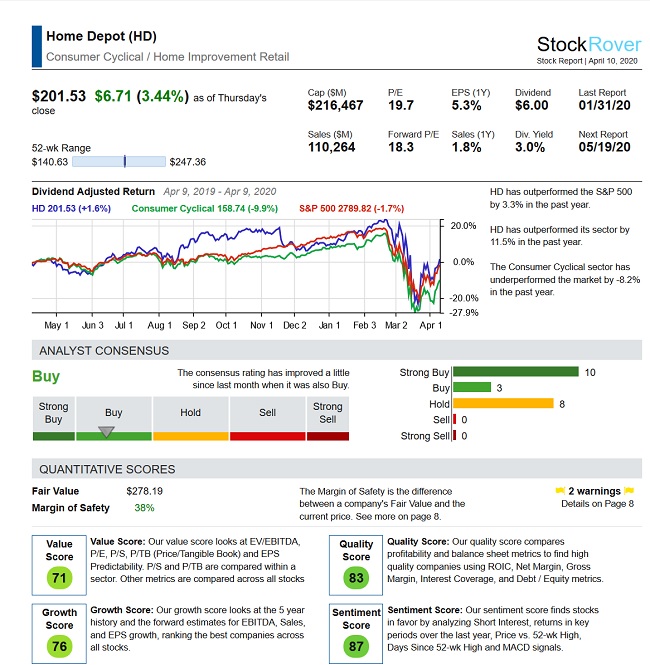 Currently, you can pull up data on more than 7,000 stocks.
These eight-page reports are jam-packed with valuable data, including:
- Overview of the stock
- Analysis
- Ratings vs peers
- Dividends
- Financial statement summary
- Valuation and profitability history
- Warnings
- Footers (report tips and disclaimers)
This is a serious stack of insights and dramatically cuts down on the hours you would typically spend collecting and organizing this data on your own.
Also, because the data follows the same pattern for each report, you can effortlessly browse the document for key data points. No more fumbling through a sea of browser tabs to find dividend history, income statements, or earnings reports.
Stock Rover’s research reports are at your fingertips and ready to read as soon as you load them up.
Brokerage Integration
Stock Rover allows you to connect select brokers through Yodlee, which is a cloud-based account aggregator.
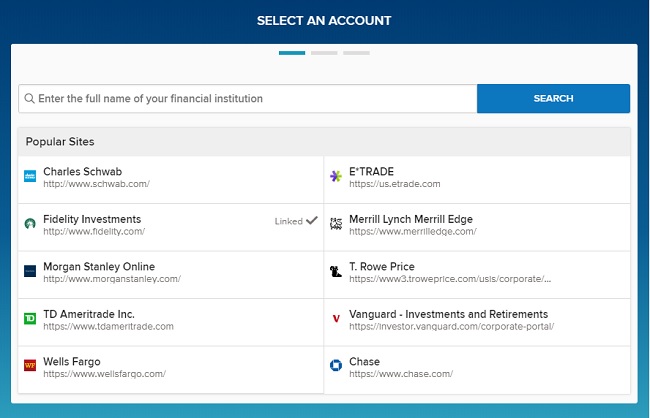 The platform is compatible with over 1,000 brokerages, and you can connect multiple portfolios to your Stock Rover account.
Yodlee syncs data from your broker directly to your Stock Rover account. This means you won’t have to hassle with manually importing your data.
Popular supported brokers through Yodlee include:
- Charles Schwab
- E*Trade
- Fidelity Investments
- Merrill Lynch
- Wells Fargo
- Vanguard
- T. Rowe Price
>> Try Out Stock Rover’s Screening Tool Now <<
Quick Start Guide
There are a lot of great features jam-packed into Stock Rover, and that can make the platform feel a bit overwhelming. Luckily, the team created a quick start guide to get you up and running as quickly as possible.
Once you open the document, you’re met with step-by-step instructions on how to make the most of Stock Rover’s more common capabilities and tips for maximizing the service’s potential.
It is 26 pages in length, but stick to the table of contents for help on whatever you’re looking for. You can always access the guide again from the website or download it to your computer as a PDF.
I’d highly recommend starting your journey here and referring back to it any time you get stuck.
Help and Support
The Quick Start Guide is an excellent place to start any time you’re feeling lost in a certain feature or want to get a little more out of the platform. For heavier questions, turn to Stock Rover’s massive help and support section.
It’s here you’ll find a laundry list of “how-to” guides that show how to do practical maneuvers within Stock Rover with ease. Helpful section titles like “Seeing What’s Hot and Finding Good Investments” help steer you where you need to go.
Further down is an entire area dedicated to product help pages. It’s organized by product features and is completely searchable.
For technical issues, turn to the support database. The Stock Rover team captures some of the most common questions in this robust FAQ.
Both the Quick Start Guide and Help and Support are parts of a much larger How To section you can access any time you want. The site’s also loaded with videos if you’re more of an auditory learner.
Portfolio Management
Beyond simple tracking, the portfolio management tool gives you a full picture of how your portfolio is structured and where risks may be hiding.
You can see correlations between holdings, identify concentration issues, and even project future dividend income.
The rebalancing tool offers clear suggestions when your allocations drift too far, which is incredibly practical if you want to stay disciplined.
I’ve set it up to send me reports any time something looks wonky so I have time to make adjustments.
Trade Evaluator
The Trade Evaluator does just that. It lets you watch the performance of your trading actions over time. You’ll be able to see how each decision you’ve made affects your performance for better or worse.
It can be a bit painful to uncover costly mistakes, but in the end, this tool will help you learn from them.
You’re free to evaluate individual trades, trades for a specific ticker, or observe how your trades look within a portfolio. It’s even possible to compare your trades to a benchmark of your choosing.
Best of all, the entire setup is completely customizable. Play around with the settings that speak to you the most and use them to up your game.
>> Try Stock Rover Mobile App Now <<
Stock Rover’s Educational Resources
Stock Rover goes above and beyond similar platforms with its customer focus. You’re not simply handed a bunch of tools and sent on your way here; the service provides a number of additional resources for the purpose of teaching and connecting you with like-minded individuals.
Educational Materials
Once you’re on the other side of Stock Rover’s login screen, a wealth of educational resources opens up to you. Whether you’re brand new to investing or a seasoned veteran, you’ll likely find something here to help improve your game.
Available materials include articles, feature tutorials, and webinars explaining how to make the most of your time within Stock Rover. It’s possible to learn everything from gauging financial metrics to creating the custom screens that’ll become the bread and butter of your research.
>> Try Out Stock Rover’s Screening Tool Now <<
Stock Rover Pros and Cons
Stock Rover offers a lot of benefits and some drawbacks.
Here’s what we found during our Stock Rover review.
Pros
- Track data on stocks, bonds, ETFs, commodities, and mutual funds
- Robust portfolio analysis tools
- Well-organized investment research platform
- Easy to compare stocks through portfolios and watchlists
- Fantastic for trade planning
- Integrates with brokerages to track portfolio positions
Cons
- Doesn’t track crypto, options, or forex data
- Cannot trade through a brokerage account
- Only collects data on North American markets (lack of foreign stock exchanges)
Cancellation Policy
Stock Rover makes it easy to either cancel your subscription service or delete your account entirely.
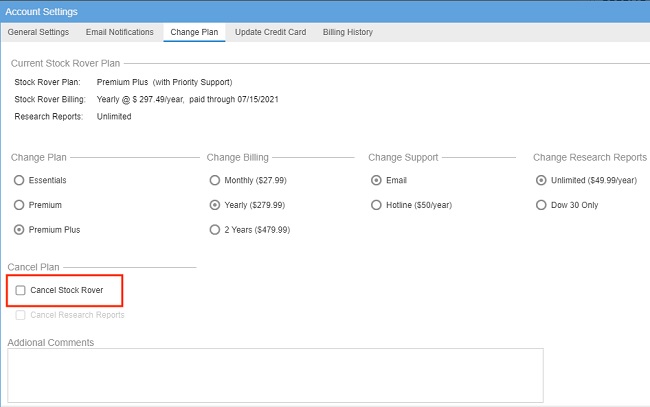 If you want to cancel your subscription, simply go to your account page and change or cancel your plan.
If you’re using a paid subscription, you can still use the software until the end of the paid term. This means that if you cancel your account on day 5, the features of your plan will remain accessible for the next 25 days.
Afterward, your account will revert to the free version.
Refund Policy
Stock Rover says in no uncertain terms that there are no refunds for paid subscriptions.
This comes as no surprise, given the fact that you’re receiving so many tools for what’s honestly a very reasonable price.
The service does offer a 14-day trial of its locked features when you sign up as a free user, so there is an opportunity to try before you buy.
By the time you make the leap to a subscription model, you should know full well what you’re walking into.
Stock Rover Plans & Pricing (Free, Essentials, Premium, Premium Plus)
Stock Rover pricing offers 4 main subscription plans:
- Free
- Essentials
- Premium
- Premium Plus
Free Plan
The free plan option is completely free to use and provides basic stocks and ETF data.
You can also track portfolios and integrate holdings from your broker.
However, the free version leaves out most of Stock Rover’s most powerful investment research features, such as stock analysis tools, stock screeners, and more.
If you just need a simple portfolio tracker, the free plan will do just fine, but it falls well short of Stock Rover’s full capabilities.
Stock Rover Essentials
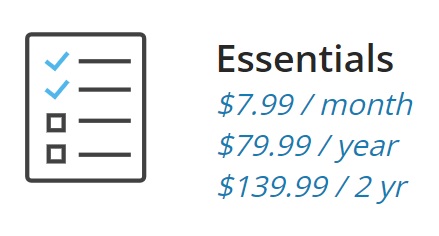
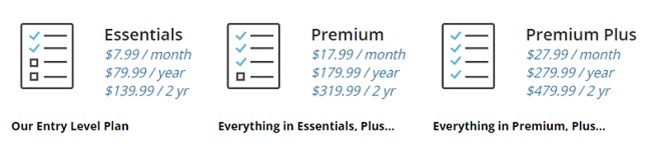
The Essentials plan costs $7.99 a month, and annual packages go for $79.99.
This plan includes up to 5 years’ worth of stock and ETF data, plus Stock Rover’s signature stock screening tool.
You can also set up email notifications with the essential tier and access more sophisticated portfolio tracking tools. However, the Essentials plan doesn’t include access to Stock Rover’s fundamental metrics and technical indicators.
Another big limitation I’ve seen here is that you can’t set any custom fields or metrics.
Stock Rover Premium
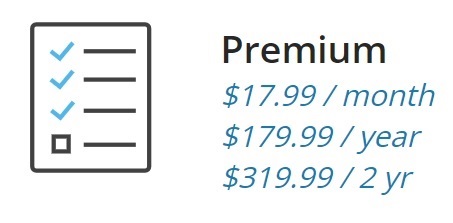
The Stock Rover Premium plan goes for $17.99 per month or $179.99 per year.
It includes access to all of Stock Rover’s fundamental metrics and technical indicators. You also get higher data limits, improved chart tools, and more detailed portfolio analytics.
The tool has extra features like correlational analysis and future dividend income projections that set it apart from the previous plans.
However, you still won’t be able to create custom fields until you upgrade to the next plan.
Stock Rover Premium Plus
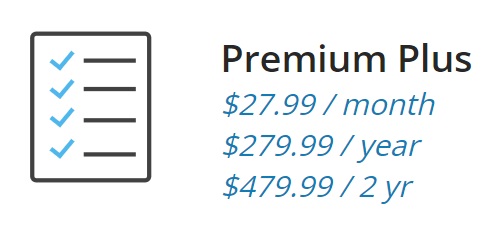
Premium Plus gives you full, unrestricted access to the Stock Rover platform and costs $27.99 per month or $279.99 per year.
With this package, you can use every tool in the Stock Rover arsenal. It also increases limits on extra portfolios and custom screens.
Additionally, this plan allows you to use unlimited custom fields for charts, tables, and graphs.
Stock Rover Free Trial Details
Stock Rover gives every new subscriber a free 14-day trial to the Premium Plus plan.
You don’t even have to give a credit card when you sign up for the trial, so you won’t have to worry about any unexpected charges. The account simply reverts to the free version when the trial expires.
Stock Rover Coupon Code
From our research, it doesn’t look like Stock Rover has any active coupon codes. Fortunately, you can get a discount depending on the length of the subscription that you sign up for.
Stock Rover Discount
Stock Rover does offer discounts if you sign up for a one- or two-year subscription. If you’re still on the fence, it might be best to test the service out for a month first.
>> Sign Up for Stock Rover’s Free Premium Plus Trial Now <<
Stock Rover Reviews by Members
If you check out independent reviewers, the general consensus seems to be that Stock Rover is a standout screener packed with valuable tools.
However, we couldn’t find any reviews on third-party sites.
The Stock Rover site hosts plenty of positive reviews of the service, though.
Here’s what others have to say about Stock Rover:
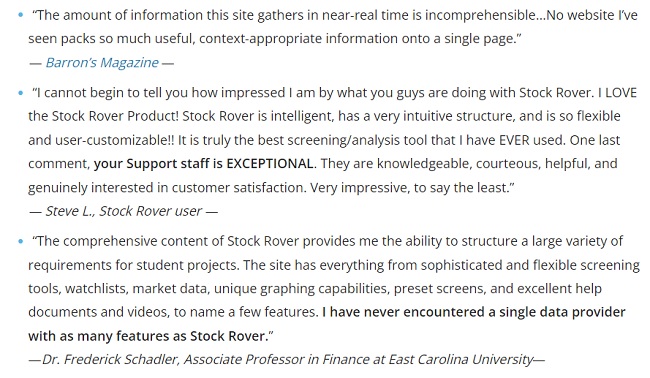
Because these are directly from the Stock Rover site, you might want to take them with a grain of salt.
>> Try Stock Rover now for free <<
Stock Rover Performance
Stock Rover has more screeners than you can shake a stick at, and there’s simply no way to try them all. That said, I did play around with the platform’s Beat the Market screener, and I was pleasantly surprised with what I saw.
Going back five years, this one screener blows gains made from the S&P 500 over the same interval out of the water. It’s equally weighted and is even benchmarked against the S&P.
While the S&P did see a 100% increase over that threshold, Beat the Market had more than double the success. There’s a good chance other screeners within Stock Rover performed even better. After all, there are more than 150 to choose from.
Platform Differentiators
Stock Rover stands apart from its competitors in a number of ways. Here are a few of the top instances:
Comprehensive, Custom Screeners – As you explore Stock Rover, you’ll discover more than 650 screening metrics you can tweak and adjust at its highest level. These tools speak to just about every investment strategy, and some advanced criteria are hard to find elsewhere.
Customization and Visualization – A stock screener is nothing without clear data, and Stock Rover rises to the challenge. There are several charts, graphs, and other visualization aids to assist you in deciphering what you need to know. Customization options take this one step further.
Easy Integrations – It’s easy to link your existing brokerage accounts to Stock Rover so you don’t have to constantly move back and forth between platforms. Having all your information in one place also limits user error.
Is This Service Right for Me?
While Stock Rover is a versatile tool, it provides the most significant value to investors who prefer a data-driven, disciplined approach to the markets. Here is who will benefit most:
The Buy-and-Hold Fundamentalist
This is where Stock Rover truly shines. If you are a self-directed investor focused on long-term wealth building, the platform’s deep dive into financial metrics and historical data is unmatched. It serves as a primary research hub for those who want to understand exactly what they own and why.
Dividend Growth Investors
If your goal is building a reliable income stream, Stock Rover’s specific tools—like the Future Income tab and Dividend safety analysis—make it an essential resource. You can project future payouts and screen for “Dividend Aristocrats” with a high margin of safety.
Active Investors with Multiple Portfolios
For those managing various accounts across different brokerages, Stock Rover acts as a centralized command center. You can integrate over 1,000 brokerages to see all your holdings in one place, allowing for high-level correlation analysis and disciplined rebalancing across your entire financial foundation.
Technical Analysis Enthusiasts
While the platform is a fundamental powerhouse, it doesn’t neglect those who use charts to find their entry points. The highly customizable charting tools and real-time updates allow you to monitor developing moves and price trends without needing a separate standalone charting service.
Day Traders
While the platform is built for patience and deliberate decision-making, day traders can still find value in Stock Rover’s real-time market data and charting capabilities.
The platform updates NYSE and NASDAQ price quotes with minimal delay, allowing short-term investors to follow open positions closely.
By using the Trade Evaluator, day traders can monitor the performance of their actions over time to identify and learn from costly mistakes. However, it is important to note that Stock Rover is not a trading app; it is a research hub, so users cannot execute trades directly through the platform.
Stock Rover vs Other Stock Screeners
Here are a couple of other stock screeners that I’ve been able to review in case Stock Rover doesn’t match your style:
Stock Rover vs. TradingView
TradingView is strongest when the goal is to see what the market is doing right now. It’s highly visual, fast-moving, and popular with traders who like spotting trends, momentum, and price patterns as they form.
The social aspect also plays a role, with investors sharing ideas and watching the same setups unfold in real time.
Compared to that, Stock Rover feels more deliberate. Instead of tracking short-term moves, it shines when evaluating companies over time and understanding how holdings fit together.
The difference largely comes down to pace: TradingView is about immediacy, while Stock Rover is built for patience and long-term decision-making.
Stock Rover vs. Benzinga Pro
Benzinga Pro excels at speed. It’s designed to surface breaking news, unusual activity, and market-moving headlines as they happen.
If you’re really active in the markets, that immediacy can be valuable, especially when timing matters and reacting quickly can make a difference.
That contrasts with Stock Rover’s strengths. Rather than pushing constant alerts, it supports deeper research and steady portfolio oversight.
Benzinga Pro helps explain what just happened in the market, while Stock Rover is better suited for deciding what to own and why over the long run.
Is Stock Rover Worth It in 2026?
Stock Rover is an excellent screener, and its features come at a great price. The platform offers a comprehensive selection of research tools that can help you take your research and trade execution to the next level.
It also combines several powerful services into one platform, making it very versatile and easy to integrate into your trading strategy. You can replace several stand-alone tools with a Stock Rover subscription, which could save you time and money over the long run.
Stock Rover’s massive research library, research reports, and stock ratings are also major perks. Plus, the platform updates its data in real-time, so you always get the most accurate, up-to-the-minute take on the market.
If you don’t want to pay, you can still enjoy some limited functionality with the free version of the software. Either way, Stock Rover is a good choice for both self-directed investors and professional traders.
We think this underrated platform can be a powerful addition to your research toolbox, and we highly recommend trying out the free version to see if it’s right for you.
Do keep in mind that the free version does not include stock screening. If you want to use this powerful platform as a stock screener, you might want to consider upgrading for a month to test the service out.
You can also test drive the service for 14 days by picking up the Premium Plus free trial by clicking any of the links in our review.
>> Click Here to Claim Your Free 14-Day Stock Rover Trial Now <<
FAQ: Stock Rover Common Questions
What is Stock Rover used for?
Stock Rover is an investment research and stock screening platform used to analyze stocks, ETFs, and portfolios. It helps investors evaluate financial metrics, compare companies, and identify potential investment opportunities based on customizable criteria.
Is Stock Rover suitable for beginners?
Stock Rover can be used by beginners, but it has a learning curve. While the interface offers guided tools and presets, new investors may need time to understand advanced metrics, filters, and valuation models.
Does Stock Rover offer a free version?
Yes. Stock Rover offers a free plan that provides basic screening, limited portfolio tracking, and access to standard financial data. More advanced features require a paid subscription.
What are the differences between Stock Rover plans?
Stock Rover offers multiple tiers, including Free, Essentials, Premium, and Premium Plus. Higher-tier plans unlock advanced screening tools, deeper historical data, portfolio analytics, and more detailed financial metrics.
Is Stock Rover better than other stock screeners?
Stock Rover stands out for its depth of financial data and portfolio analysis tools. However, it may not be ideal for traders who prioritize real-time charting or technical indicators, where other platforms may perform better.
Does Stock Rover provide real-time stock data?
Stock Rover primarily focuses on end-of-day and historical financial data. While it includes timely market information, it is not designed for real-time day trading or rapid intraday execution.
Can Stock Rover track investment portfolios?
Yes. Stock Rover includes portfolio tracking features that allow users to analyze holdings, performance, diversification, and risk metrics across multiple portfolios.
Does Stock Rover include stock ratings or recommendations?
Stock Rover does not issue direct buy or sell recommendations. Instead, it provides analytical tools and data that investors can use to form their own investment decisions.
Is Stock Rover worth paying for?
Stock Rover may be worth the cost for long-term investors who value deep financial analysis and screening flexibility. Investors seeking simpler tools or short-term trading signals may find less value in paid plans.
How often is Stock Rover data updated?
Financial statements and company data are updated regularly as new information becomes available. Update frequency depends on earnings releases and data provider schedules rather than real-time market movements.
Does Stock Rover support international stocks?
Stock Rover primarily focuses on U.S. stocks and ETFs. Limited international coverage may be available, but it is not designed for comprehensive global market analysis.
Are there Stock Rover alternatives investors should consider?
Yes. Popular alternatives include platforms that focus on technical analysis, real-time charting, or simplified screening. The best alternative depends on whether an investor prioritizes fundamentals, technicals, or ease of use.
Does Stock Rover offer a free trial for paid plans?
Stock Rover occasionally offers trial access or limited-time previews of paid features. Availability can vary, so users should check current offers when signing up.

 Tags:
Tags: