


Finding a reliable trading automation tool that actually simplifies technical analysis is harder than it sounds.
Most platforms either overwhelm you with features or fall short when precision matters.
TrendSpider hits a different gear.
It combines AI-driven charting, no-code backtesting, real-time scanning, and a fully integrated options suite into one platform built to eliminate the grunt work from your research.
Here is my honest TrendSpider review for 2026.
 What Is TrendSpider?

TrendSpider combines AI-powered charting, automated trendline detection, backtesting, real-time scanning, and options analytics into one streamlined platform. Its no-code automation tools and multi-timeframe analysis make advanced technical workflows faster, more consistent, and more accessible for active traders. TrendSpider’s proprietary automation engine eliminates much of the manual chart work traders typically handle themselves. Features like Sidekick AI, automated pattern recognition, and Strategy Tester give users institutional-style analysis tools without requiring coding knowledge. TrendSpider is built primarily for active, technically focused traders rather than passive investors or long-term portfolio builders. Its deep automation and analytics suite also comes with a moderate learning curve for newer market participants.
TrendSpider is an automated trading platform founded in 2016 by Dan Ushman and Ruslan Lagutin.
It brings together AI-driven charting, strategy backtesting, real-time market scanning, smart alerts, and automated trendline detection under one roof.
Recent additions include a fully integrated options analysis suite, Sidekick AI powered by Claude Opus 5, portfolio-wide strategy testing, and a deeper fundamental data panel.
What separates it from most charting software is the automation: instead of manually drawing trendlines or scanning hundreds of charts one at a time,
TrendSpider handles it algorithmically.
The result is a platform built for traders who want consistent, data-driven analysis without spending their entire day staring at screens.
Is TrendSpider Legit?
Yes, TrendSpider is a legitimate and well-established platform with a verifiable track record.
Founded in 2016 and headquartered in Illinois, it is led by CEO Dan Ushman and a team of developers and market analysts.
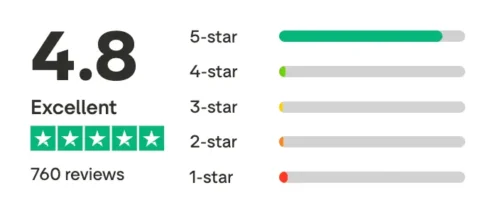
The company holds an A+ BBB rating and averages above 4.7 stars on Trustpilot. What I find most reassuring is that TrendSpider earns credibility through consistent product updates and transparent billing and refund policies, not through hype. Unlike many charting tools that promise the world and deliver a screener, TrendSpider focuses on practical automation that traders actually use.
It serves both retail and professional users, and the depth of its support infrastructure signals a company built to stick around.

How to Use TrendSpider
TrendSpider works across stocks, forex, crypto, futures, and now options contracts directly within the platform.
The core workflow is straightforward: open a chart, let the AI identify trendlines and patterns automatically, then apply your own indicators or screener conditions on top.
You can run backtests without coding, set alerts on virtually any condition, and connect trading bots to your broker through SignalStack.
For anyone new to the platform, TrendSpider publishes detailed blog posts and tutorial content covering both platform features and broader technical analysis concepts.
The learning curve is real but manageable, and once the automation clicks, the time savings are significant.
Most users describe it as going from hours of manual chart work to a much faster, more systematic research routine.
Can You Trade from TrendSpider?
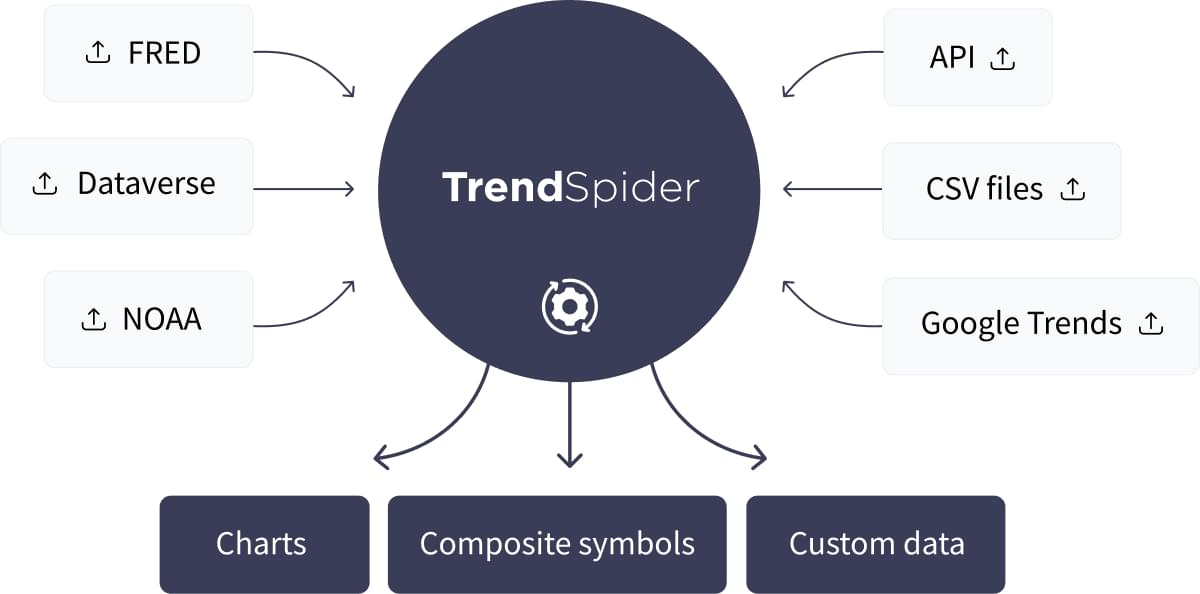
TrendSpider is an analysis and automation platform, not a brokerage.
Trade execution flows through its integration with SignalStack.
The platform connects to brokers including TradeStation and Interactive Brokers, and if your broker is not currently supported, you can request a connection.
I appreciate how this hybrid model works in practice: you get the analytical firepower of TrendSpider combined with the execution reliability of your existing broker.
It is not one-click trading, but the bot-to-broker workflow via webhooks comes close.
For traders who want automation without abandoning their preferred broker relationship, this is a smarter setup than forcing you to switch to a new account just to use the platform.
TrendSpider Review: What’s Included?
Here are the top features I uncovered during my TrendSpider review:
Real-Time Data
TrendSpider delivers real-time market data across stocks, ETFs, crypto, forex, and futures from institutional-grade feeds.
Data updates either in real time or with a minimal delay depending on the asset class.
The multi-timeframe data engine adjusts charts instantly, so if you are tracking a stock on the 15-minute and daily timeframe simultaneously, both refresh together.
Crypto and equities stream directly into your dashboard. Futures data is available with exchange add-ons.
For traders who rely on precision timing, this depth of access matters more than most product pages admit.
Acting on a signal based on stale data is not just frustrating, it is expensive.
TrendSpider keeps everything live, which is a baseline expectation at this price tier that the platform consistently meets.
Charts & Analysis

The charting experience is where TrendSpider really shines. You can create fully customizable layouts, layer multiple indicators, and toggle between standard or Raindrop Charts, a proprietary visualization that combines price and volume in a single candle.
Multi-timeframe analysis lets you overlay different time horizons on a single chart, so short-term signals can be checked against the bigger trend without switching windows.
The system automatically identifies trendlines, Fibonacci levels, and candlestick patterns using algorithmic detection, eliminating the subjectivity that makes manual chart drawing unreliable.
I find the automated trendline detection genuinely useful for consistency: the AI reads the same chart the same way every time, which is more than you can say for most human chart readers.
Market Scanning
TrendSpider makes discovering new trade opportunities effortless.
Its Market Scanner lets you search thousands of symbols using your own technical conditions. You can combine multiple indicators, like RSI, MACD, and moving averages, and the platform instantly finds all assets that fit your criteria.
The scanner works across multiple timeframes and now supports options-based conditions and indicators, allowing you to filter opportunities based on both price action and derivatives data.
You can save custom scans or use hundreds of pre-built templates, covering everything from trend breakouts to oversold setups.
Perhaps best of all, you can set up automations so your scans run continuously in the background, updating as the market moves.
Whenever a symbol matches your criteria, it automatically populates in your watchlist.
TrendSpider also includes Smart Watch Lists — dynamic lists that automatically update based on criteria you define, like sector, market cap, new 52-week highs, or ETF holdings. Over 700 pre-built Smart Watch Lists are included out of the box.
Strategy Development
TrendSpider’s Strategy Tester lets you build and validate a complete trading system with zero coding. Select your indicators, define entry and exit conditions, and the platform runs a full historical backtest instantly.
Results include win rate, profit factor, drawdown, average trade performance, and total returns. Trades are plotted visually on the chart so you can see exactly how your logic performed across different market environments.
You can optimize by adjusting lookback periods, thresholds, and exit rules from a visual interface.
Once a strategy passes, save it, monitor it live, or convert it into an alert for real trading.
I rate the visual trade plotting as the most underrated part of the tester. Seeing where entries and exits landed on the chart tells you more than statistics alone.
One of TrendSpider’s newest additions is the Group Strategy Tester, which expands backtesting well beyond a single chart.
Previously called the Variance Explorer, this tool has been renamed, redesigned, and integrated directly into the main Strategy Tester workflow.
Instead of testing one symbol at a time, you can now run one or multiple strategies across an entire watchlist, portfolio, sector, or index and compare every result in a single sortable table.
For anyone who has ever backtested a great setup on one stock and then wondered whether it actually holds up anywhere else, this answers that question at scale.
It is not a portfolio simulator, but it is the next best thing for verifying a strategy before real money goes in.
Trading Bots
TrendSpider’s Trading Bot feature automates your strategies without any coding, using alerts and webhook integrations to connect directly to supported brokers.
Build and backtest a system (a simple moving average crossover with defined stop-loss and take-profit levels, for example), then convert it to a live bot by selecting “Launch as Trading Bot.”
Configure the timeframe, notifications, and broker integration via SignalStack. From there, the bot runs continuously, monitors strategy conditions, and fires order signals whenever entries or exits trigger.
Execution requires a compatible third-party routing service or broker integration.
You can also use bots for non-trading actions: posting updates to Discord, Twitter, or Google Sheets.
For a no-code automation tool, the flexibility here is impressive.
AI Strategies
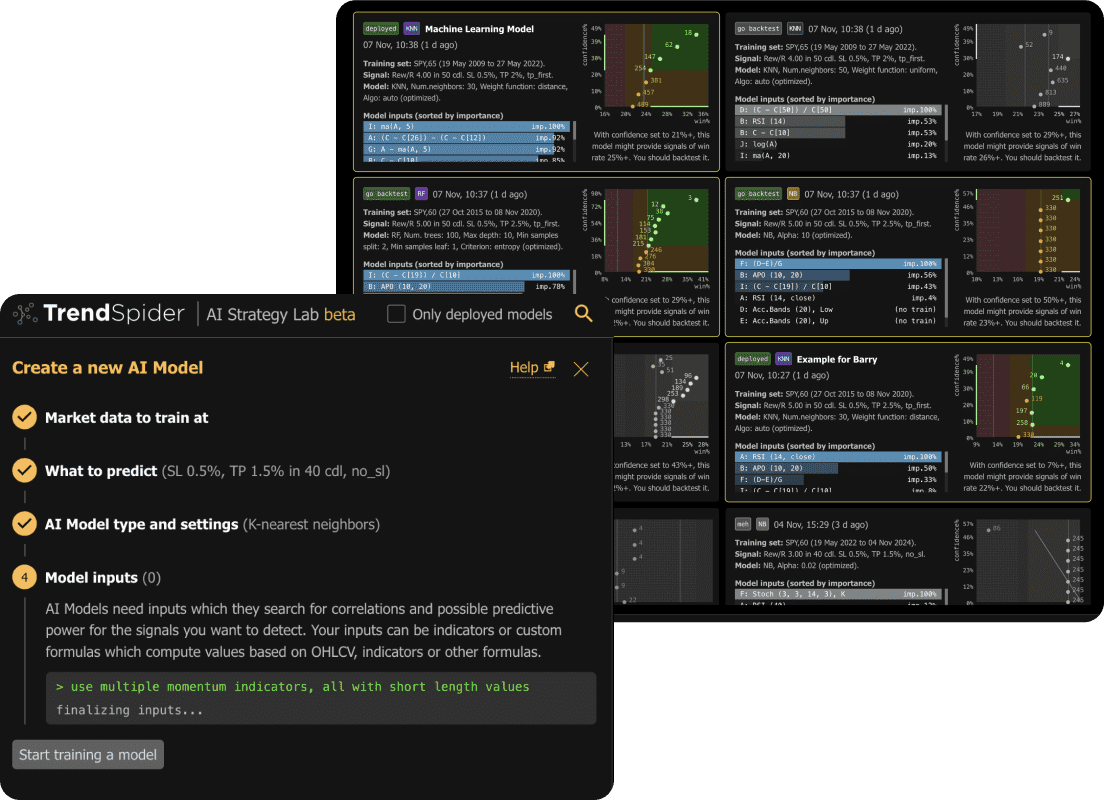
TrendSpider currently offers three distinct AI tools. Each does something different, and it is worth knowing which one to reach for.
AI Coding Assistant
The AI Coding Assistant turns plain English into working custom JavaScript indicators.
Type something like “Create an indicator that highlights when RSI crosses above 50 and price breaks the 20-day moving average” and the assistant writes the code, applies it to your chart, and visualizes the historical triggers automatically.
No developer required. It is fine-tuned specifically for market logic and TrendSpider’s scripting environment, so the output is usable without manual cleanup.
Sidekick AI
Sidekick is TrendSpider’s AI research and workflow agent, now running on Claude Opus 5 (Anthropic’s newest reasoning model, released July 24, 2026).
Unlike a general-purpose chatbot, Sidekick connects Claude Opus 5 directly to TrendSpider’s live market data: your open charts, segment-level fundamentals, earnings transcripts across every company in the database, SEC filings, insider trades, and your actual broker-connected portfolio.
You can ask it to interpret a backtest, search earnings calls for a specific management signal, evaluate company fundamentals, or build a custom scan or indicator from a plain English prompt.
Because it reasons over trusted structured data rather than scraped web content, the output is considerably more relevant for active trading research than a general AI assistant.
ML Quant Lab
ML Quant Lab lets you train machine-learning models on historical price data without writing statistical code.
Once trained, the model signals integrate directly into your charts, scans, backtests, alerts, and trading bots.
It is the most technical of the three tools and is aimed at traders who want quantitative signal generation without building a full data science workflow from scratch.
System Tools
TrendSpider’s system tools make the platform feel like a genuine trading assistant rather than a collection of disconnected features.
Multi-chart workspaces, synced watchlists, and customizable layouts can be switched between strategies or markets with a single click.
The real-time options chain panel refreshes roughly every 10 seconds, making it easy to monitor contracts without leaving the platform.
Sector Heatmaps, a Seasonality Analyzer, and Custom JavaScript Scripting round out the analytical toolkit.
I appreciate that TrendSpider continues adding to Sidekick rather than shipping one feature and treating it as finished.
The platform also surfaces dark pool and ATS volume, FINRA short-volume data, US Congressional trading disclosures, FRED economic data, and social sentiment from StockTwits and WallStreetBets, all viewable directly alongside your charts.
You can now save and share any Sidekick AI conversation via a view-only link.
Anyone can open the shared research without needing a TrendSpider account.
For traders who work with colleagues, share ideas in groups, or want to document a research process, this closes a real gap. Previously, AI-assisted analysis lived only in your session.
Now it travels with you.
Access From Multiple Devices

TrendSpider works seamlessly across web, desktop, and mobile devices. The web and desktop versions are identical in functionality, delivering a full suite of tools including multi-chart layouts, strategy testing, and automation controls.
The mobile app, available on iOS and Android, allows you to monitor alerts, track your watchlists, and review charts on the go. While it’s more lightweight compared to the desktop version, it’s constantly improving and supports key features like drawing tools and indicator overlays.
All data, alerts, and layouts sync automatically between devices. You can start building a strategy on your desktop and check results on your phone later.
For folks who move between screens frequently, this cross-device harmony ensures that you’re always connected to your analysis, wherever you are.
Support
TrendSpider’s customer support is consistently rated among the best in the trading software space. Every subscriber gets access to live chat, email, and comprehensive onboarding assistance.
All users can schedule 1-on-1 training sessions with a platform specialist who walks them through setup, alerts, and strategy tools, with higher tiers getting more access.
The Knowledge Base and Help Center are also exceptional, featuring hundreds of tutorials, video guides, and case studies for both beginners and pros.
The company’s support team is known for being responsive and personal, real humans who understand trading and can solve issues fast.
In a world where most platforms hide behind automated chatbots, TrendSpider’s accessible, knowledgeable support adds major value to the subscription.
Asset Insights
The asset insights feature is accompanied by a newsfeed so users can view the live streams of their partner, Benzinga, on the chart.
Meanwhile, this feature presents corporate earnings data (past and present) on your chart as well as dividends data such as declaration dates, ex-dividend dates, and payout dates.
TrendSpider provides stock splits where users can review data sets related to split actions on a chart, including effective dates and announcements.
You can even view analyst recommendations and actions data via the Analyst Ratings Data feature.
TrendSpider has revamped its fundamental data with a new Segments & KPIs panel covering roughly 1,500 major U.S. companies.
Instead of only displaying traditional financial statements, it now includes revenue breakdowns by business segment and geographic region, profitability metrics, capital expenditures, and company-specific performance indicators.
I find this addition makes the platform considerably more useful for anyone who wants to combine technical analysis with actual business research rather than treating them as separate workflows.
Add in their insider trading component that features corporate insider information on their shares, plus a seasonality visualization to display how seasonal assets are within seconds, and you get a robust asset insights feature.
The platform also surfaces dark pool and ATS volume, FINRA short-volume data, US Congressional trading disclosures, Federal Reserve (FRED) economic data series, and social sentiment from StockTwits and WallStreetBets — all accessible alongside your charts without leaving the platform.
Alerts
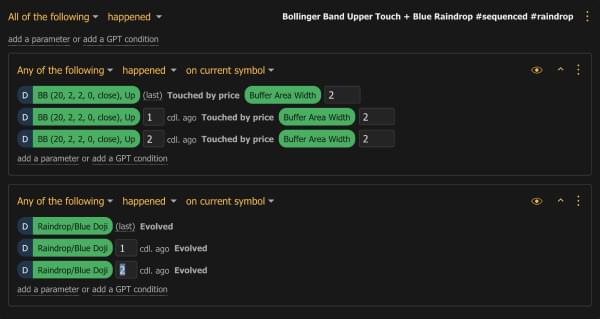
The alerts that TrendSpider uses are plentiful, instantaneous, and cover a lot of ground.
Active-alert duration scales by plan: 30 days on Standard, 90 on Premium, 180 on Enhanced, and 365 on Advanced.
You can right-click on indicators to create instant price alerts on them.
There are also ways to create alerts on manual drawings, options contracts, automated trendlines, and custom indicators.
The automatic Fibonacci alerts create alerts around different levels of automated Fibonacci retracements.
Through sensitivity control, you can control what is framed as a sensitivity buffer zone.
You can control such a zone around an alert to get special notifications on approach.
Using triggers for dynamic price alerts, users can monitor specific events like breaks, bounces, and touches in your alerts.
Multi timeframe alerts let you create alerts that use data from multiple timeframes in a single alert.
You can also create complex alerts using all sorts of indicator combinations.
>> Like all that TrendSpider has to offer? Click HERE to sign up NOW! <<
How Much Does TrendSpider Cost?
TrendSpider offers multiple subscription plans designed for different experience levels, with each giving access to the platform’s core features.
The differences lie in advanced functionality, usage limits, support, and automation capabilities.
Standard is the entry level and gives you the essentials for about $53 per month, making it a solid choice for anyone who wants access to TrendSpider’s automated charting, scanning, alerts, and AI-powered analysis without paying for higher usage limits.
At the time of writing, TrendSpider is offering the Premium Annual plan at 55% off, bringing the first-year price down to $491.40 (normally $1,092/year). This tier boosts your capacity and is the sweet spot for most users.
Enhanced is aimed at power users and intraday-style users, expanding those limits even further. TrendSpider currently offers the Enhanced Annual plan at 55% off, reducing the first-year cost to $658.80 (normally $1,464/year).
The top-tier Advanced plan, sitting at around $155 per month, is designed for professionals, algorithmic users, and those who require the platform’s highest limits and priority support.
TrendSpider also offers a Business plan for teams and organizations, available through their sales team.
If you plan to use Sidekick AI regularly, there is also a 20% lifetime discount available on Sidekick subscriptions — you must be logged into your TrendSpider account before opening the checkout link to activate it.
 How Do I Cancel TrendSpider?
 How Do I Cancel TrendSpider?
TrendSpider’s policy does not include prorated refunds but ensures users retain full access through their billing period
But you can stop future charges on your account when you’re ready to move on.
You can cancel the automatic renewal of your TrendSpider account through their hassle-free online system.
You can also contact customer support via email, live chat, or phone to let them know you’re canceling your subscription.
By deactivating your account, you also deactivate future renewals of your TrendSpider account.
If you cancel during the 14-day paid trial, you keep access until it ends and won’t roll into a paid plan. (The trial fee itself is non-refundable.)
Should you cancel during your paid subscription period, you’ll continue to have access to TrendSpider until the end of your pre-payment period, preventing future renewals.
If you don’t cancel your TrendSpider membership before the automatic renewal kicks in, you will be charged your membership fee for that renewal period.
>> Ready to sign up for a TrendSpider account? Just click HERE! <<
TrendSpider has many features that set it apart from other investment platforms, but it’s not perfect. Take a look at all the pros and cons of our TrendSpider review.TrendSpider Review: Pros and Cons
Pros
Cons
TrendSpider Review: Is the Service Right for Me?
If you’re an active day trader or someone with a wealth of experience with trades, TrendSpider is perfect for you.
Whether you need a trendline, analysis, or dynamic price alerts, the hard work is essentially done for you so you can focus more on the facts and figures to improve your trading expertise.
Day trading and trading opportunities will become easier with the many tools and data that TrendSpider provides.
TrendSpider Reviews by Traders
“I think this is the most innovative technology for traders since live streaming.”
– Scott Smith, Professional Trader and Owner of LiveTradePro.com
“I believe TrendSpider Raindrop Charts are the biggest advance in visual charting since Steve Nison brought candlesticks back from Japan.”
– Steve Burns, Professional Trader & Founder of New Trader University (NewTraderU)
“I have to say thanks for this system. As a result, I’m getting into trades lower and selling higher.”
– Chris, Professional Trader

Is TrendSpider Worth It?
TrendSpider is worth it for anyone serious about trading analysis who wants automation to handle the repetitive parts.
The platform covers stocks, ETFs, options, crypto, forex, and futures from one interface.
The 2026 version is meaningfully more capable than earlier releases: portfolio-wide strategy testing, Claude Opus 5 inside Sidekick, expanded fundamental data, and shareable AI research close gaps that previously required separate paid tools.
I see TrendSpider as one of the few platforms that keeps shipping features traders actually ask for rather than features that look good on a product page.
If you want AI-driven analysis, automation, and options data in one workflow, this is the cleaner answer.
>> Ready to streamline your trading analysis? Click HERE to sign up for TrendSpider today <<








 Tags:
Tags: